A client says, “We have WordPress VIP. Can you get access?” It sounds like one invitation and a quick login. In practice, the next question should be: access to do what?
Writing an article, reviewing an environment and deploying a theme are different jobs. Treating them as one permission request creates confusion before the project has even started. An administrator account is a powerful tool, but it is a poor substitute for a clear brief.
WordPress VIP is Automattic's enterprise content platform. It combines managed infrastructure with tools and support for demanding publishing operations. For a new customer, getting started involves a commercial conversation and onboarding. For a contributor joining an existing customer, access depends on the systems and responsibilities involved.
This guide explains both routes and proposes a practical agency workflow. Official sources were checked on 23 October 2026. The scenarios below are planning examples, not a report of a RichFolds VIP deployment or a hands-on review of a private customer dashboard.
What you are actually buying
The current VIP plans are Standard, Enhanced and Signature. All include managed hosting, enterprise security and publishing tools; support and other capabilities vary by tier. The page asks prospective customers to discuss their traffic, sites and support requirements for a tailored quote.
That makes VIP a platform procurement decision. A client should be able to explain which operational problem the service is expected to solve: publishing across brands, meeting a reliability requirement, reducing infrastructure work or supporting an editorial operation that cannot tolerate long interruptions.
A useful discovery question is: what happens when the website is unavailable, or when publishing takes too long? For one business, a delayed campaign page is inconvenient. For another, a missed publication window affects contractual commitments and an entire newsroom. The same familiar editor can sit inside very different operating requirements.
Avoid choosing by the word “enterprise” alone. It looks reassuring in a proposal, but it cannot write your acceptance criteria.
WordPress VIP access has three separate parts
The VIP getting-started guide separates WordPress admin, code-repository and VIP Dashboard access. Use that distinction when writing the project brief.
| Work to complete | System to discuss | Question for the client |
|---|---|---|
| Edit or publish website content | WordPress admin | Which site and content role are needed? |
| Inspect platform environments or perform approved operations | VIP Dashboard | Which organization, application and permitted actions? |
| Review or change application code | The project's code repository and deployment setup | Which repository, branch and review process? |
This table is a planning aid, not an instruction to grant every contributor all three. A content editor may have no reason to deploy code. A developer reviewing a template may not need authority to manage every user in an organization.
Write the intended action beside each access request. “Review the campaign template on staging” is useful. “Give the agency everything” postpones the real decision until something breaks.
Joining an existing VIP organization
According to the VIP Dashboard access documentation, a user needs an accepted organization invitation and an assigned organization role. The invitation's email address matters. Authentication through GitHub or WordPress.com requires the matching email described in the documentation, and login uses multi-factor authentication.
Only an organization administrator can invite users or change their VIP Dashboard roles. Signing in with GitHub does not itself grant access to the application's repository.
For an agency handover, ask the client to identify the organization administrator and confirm the intended invitation address before sending requests. A personal address, an employer-managed identity and a project mailbox are not interchangeable simply because the same person reads them.
If an invitation arrives at one account while the browser is signed into another, stop and check the identities. Repeatedly clicking the invitation is unlikely to improve the situation. Do not solve the mismatch by sharing another person's login.
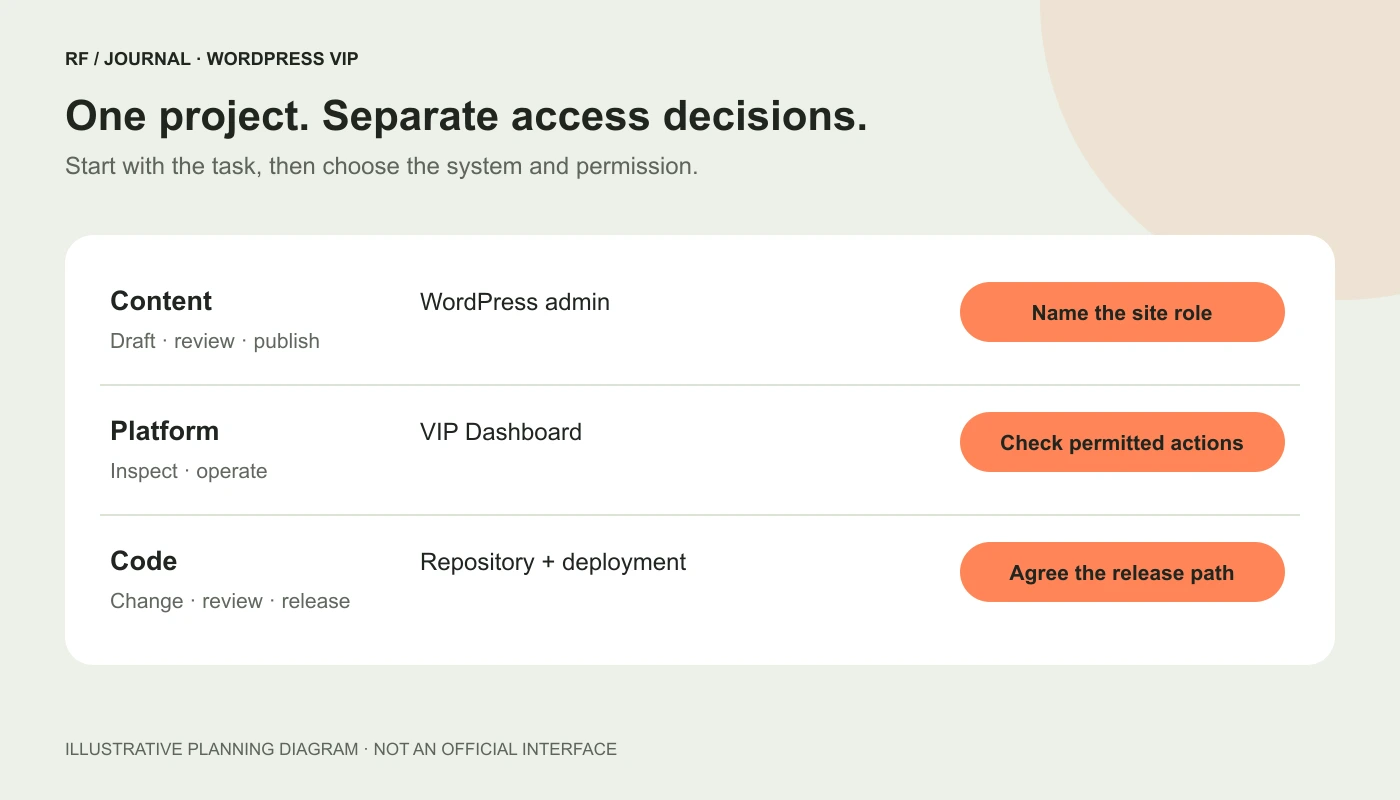
A proposed responsibility map. These are separate access decisions, not a screenshot of a customer's permissions.
Choose application permissions from the work
VIP distinguishes organization-level permissions from application-level permissions. Its App roles documentation lists App read, App write and App admin for users assigned an Org guest role. Those permissions can differ by application.
Do not assume the word “write” means a harmless content-editing permission. The current permission table includes operational actions such as imports and launching a site under App write. Check the actual action list before selecting a role.
For a fictional three-brand client, an external developer might be assigned access to the application they are maintaining while having no access to the other brands. The exact role still depends on the required tasks and the client's rules.
Use an access register with four fields: person, system, authorized work and review date. Add an accountable owner who can change or remove permissions when the engagement ends. This makes offboarding a planned part of delivery rather than a calendar reminder nobody remembers creating.
WordPress editor access is its own conversation
The WordPress user-access guidance describes site administrators managing WordPress users and explains the additional considerations for multisite networks. A network-wide Super Admin has a much wider scope than a contributor assigned to one site.
For a publishing project, start with the editorial task. Does the person draft, review, publish or manage settings? Which site belongs in the assignment? Verify the resulting capabilities against the real installation, including any custom roles.
A useful acceptance check is to have the authorized reviewer complete a normal task with their own account. Can they edit the right page? Can they preview it? Does publication follow the agreed process? Record the outcome without collecting passwords or private authentication details.
The point is to verify the intended workflow. “The account exists” is only the beginning of that check.
Code access needs a named owner too
The GitHub access documentation explains repository invitations, two-factor authentication and administrator responsibility for managing contributors. It recommends limiting administrator permissions and assigning the level needed for the work. It also documents an important restriction involving GitHub Enterprise Managed Users and repositories in the wpcomvip organization.
Check that identity requirement early when a large client's developers use centrally managed GitHub accounts. Discovering an account restriction on release day is an avoidable form of excitement.
Before development starts, record who can review a change, who can merge it and which branch deploys to which environment. Repository membership is not a substitute for a release agreement.
For a template change, the review should cover more than the screenshot in a pull request. Name the page types affected, the editorial controls involved and the customer journeys that must keep working. An attractive heading can still ship beside a broken enquiry form.
Development on VIP changes familiar hosting habits
WordPress on VIP documents infrastructure differences that matter during migration. There is no SFTP access for managing files inside the site's wp-content directory. Theme and plugin management is handled through the platform's deployment workflow rather than installing or removing them in WordPress admin. Media uses the VIP File System, and the platform uses NGINX rather than per-site Apache .htaccess files.
Audit the existing site's assumptions before promising a straightforward move. A plugin that expects to write an export beside its PHP files deserves investigation. So does a redirect process that depends on editing an Apache file.
Our CMS migration plan provides a broader way to inventory content, URLs and responsibilities. For VIP specifically, compare each integration with the platform requirements and confirm the supported approach with the project team.
Do not translate “the infrastructure is managed” into “every existing plugin will behave exactly as before.” Those are different claims.
Default deployment and Custom Deployment are different routes
The build-and-deploy guide explains the default workflow, including committed build assets and a CI/CD arrangement using deploying branches. For a WordPress environment, a developer should not assume that uploading unbuilt source code will cause the platform to run the project's local build process automatically.
VIP also documents Custom Deployment. This supports developing application code outside the application's wpcomvip repository and deploying a correctly structured archive through supported tooling. It has requirements and limitations; it is not permission to upload an arbitrary folder.
Ask which method the actual environment uses. Then document the path from source change to deployed artifact. Include dependency installation, asset compilation, checks, review and the person authorized to release.
A proposed acceptance check is to trace one deliberately small change through a non-production environment. Record the source revision and the deployed result. The aim is a reproducible process, not a heroic demonstration involving someone's laptop and a mysterious ZIP called final-final-2.
Local development should match the important constraints
The local and cloud development guide describes VIP's local development environment and GitHub Codespaces options. It also distinguishes those supported environments from other tools a team may choose to use.
For a proposed trial, select a representative template, a content sample and an integration that exercises the site's real constraints. Record the versions and configuration used. Keep production data handling within the client's approved process; a convenient local copy is still a copy of client data.
Separate local success from staging success. A page that works on a developer's machine has answered one question. It has not established that the deployed environment has the same configuration, dependencies and access to services.
Our WordPress update checklist approaches verification through business journeys. That approach is useful here too: test what editors and visitors must accomplish, alongside code-level checks.
Understand who maintains what
The VIP FAQ describes a shared responsibility model. VIP manages and patches platform components including WordPress core and PHP. Customers remain responsible for maintaining their third-party plugins, themes and custom code; platform scanning does not transfer all that work to VIP.
Make this division explicit in the statement of work. Who evaluates a plugin update? Who fixes a custom integration when an external API changes? Who owns an issue that the platform support team identifies in application code?
A practical responsibility sheet should also distinguish response from resolution. A support commitment describes a defined service obligation. It does not mean every application bug disappears within the response window.
Assign a primary contact and a backup for each operational area. A technically excellent platform cannot make a decision on behalf of a client team that has not agreed who is allowed to approve the work.
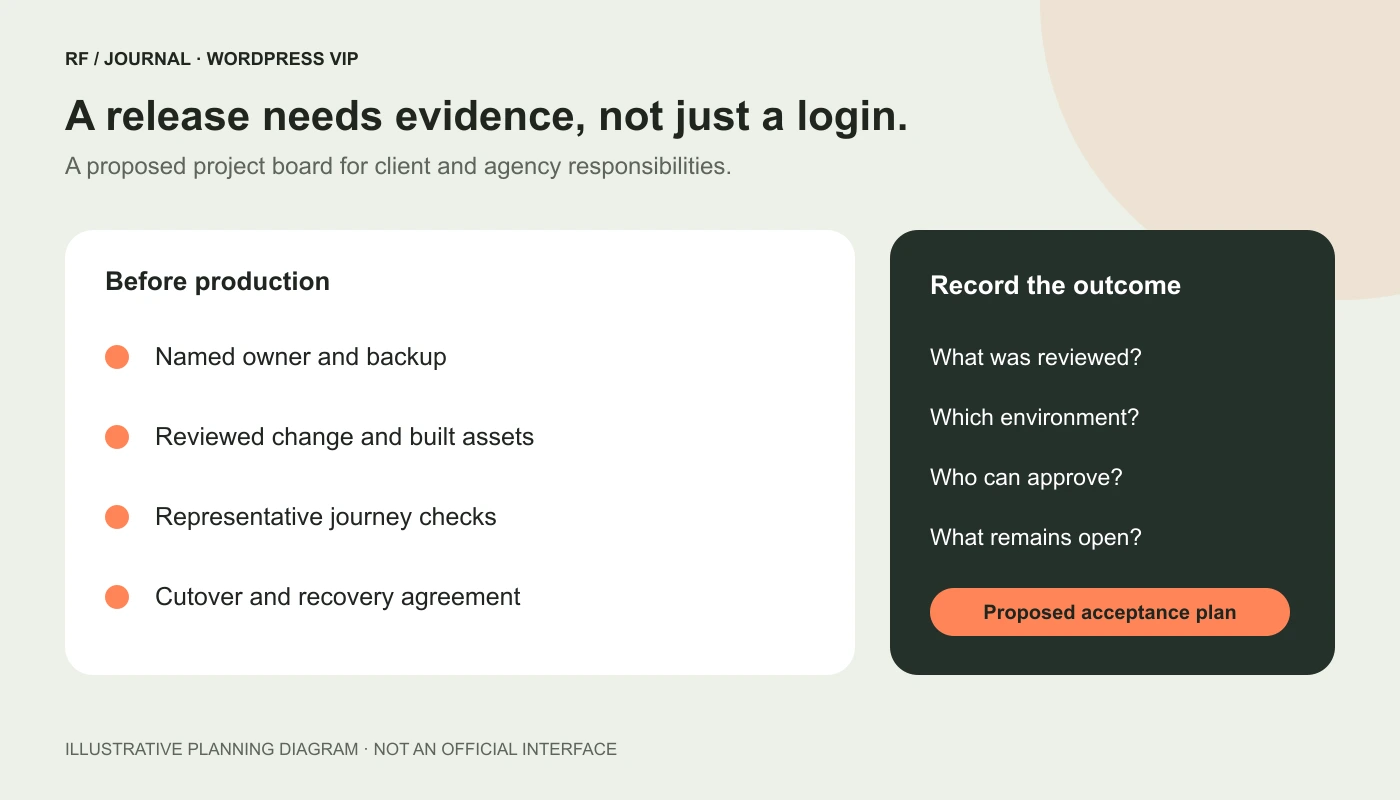
Proposed project evidence, not measured performance or a completed VIP migration.
Build a budget around the whole operating model
The current pricing page offers tailored quotes rather than a universal checkout price. Request a written proposal that matches the intended sites, traffic profile and support needs. Recheck the package details when making a buying decision; this article is not a quotation.
Build your comparison with separate rows for platform charges, application development, migration, editorial training and ongoing maintenance. Add any paid services only when their inclusion has been confirmed.
Then compare the same scope across alternatives. A lower hosting invoice can hide substantial engineering work, while a more comprehensive platform can still require an agency and an internal product owner. Neither observation establishes which option is cheaper for a particular client.
Use a simple workload model rather than an invented return-on-investment percentage. List the work currently performed, who performs it, what changes under the proposed contract and what still remains. Ask the provider to clarify uncertain items before assigning a saving to them.
When an agency should shortlist VIP
Consider evaluating VIP when the client can describe demanding publishing operations and is prepared to invest in a managed platform and a disciplined delivery process. Multiple brands, substantial editorial coordination, strict operational requirements or important traffic events can justify a closer discussion.
These are discovery prompts, not minimum eligibility rules or guarantees that VIP is the correct choice. A busy shop and a newsroom may need very different architecture even when their traffic charts look similar.
For a modest marketing site, start by identifying the actual constraint. If the problem is an unclear content model or an unreliable form, establish why changing platforms would solve it. An expensive migration can faithfully carry an old problem into a new environment.
Our CMS selection guide starts with the team's work. Use the same principle here: choose the operating model around the people and tasks, then compare products against it.
A practical discovery and migration sequence
VIP's Migration & Launch service describes a defined service scope and leaves full quality assurance and post-launch development responsibilities with the customer or agency. Confirm the purchased scope and timeline; a marketing estimate is not a guarantee for your project.
For a proposed agency engagement, organize the work into four decisions:
- Fit: document the business problem, current limitations and reasons to evaluate VIP. Agree what would make another option preferable.
- Readiness: inventory content, plugins, integrations, redirects, identities and operational owners. Identify assumptions that need investigation.
- Evidence: review representative editorial and visitor journeys in the intended environment. Record unresolved issues and who can accept or fix them.
- Release: agree the content cutover, approval owner, monitoring responsibilities and recovery plan before changing production traffic.
For a fictional multi-brand publisher, the first useful deliverable might be a tested article template and a working editorial preview route. For another client, search and enquiry routing may be the important proof. Choose examples because they expose the project's risks, not because they are easiest to screenshot.
Preserve URL behavior and verify redirects, canonical URLs and metadata as part of the migration work. Platform adoption does not remove the need for a careful content and search transition.
What about the AI capabilities on the VIP website?
The official homepage now emphasizes AI-assisted publishing, agent workflows and governed content. Treat those statements as the provider's description of its platform direction, then ask for a demonstration of the specific capability your project needs.
A useful proposed trial is a draft-only task: an authorized editor supplies approved source material, an assistant suggests a revision and the editor reviews it before publication. Specify which content the assistant can access, where the result goes and which actions require human approval.
Ask which integrations and configuration are required, what the commercial scope includes and how the client can inspect or stop the workflow. Do not assume a platform invitation also grants an AI tool permission to read private content or publish changes.
Likewise, a product claim about AI discovery is not a guarantee that a particular article will appear in an assistant's answer. Evaluate content quality and discoverability separately from the demonstration of a working integration.
What to send the client before asking for access
Send a concise request with the named people, their invitation addresses, the exact systems involved and the work they are authorized to perform. Include the target application or site and a contact for access problems.
Attach the release and review responsibilities separately. That keeps the request understandable without pretending an invitation is permission for every later action.
The best starting point is a small, explicit agreement: the right person can reach the right environment, complete the intended task and explain the next approval step. Once that is clear, WordPress VIP becomes a platform the team can evaluate and operate, rather than a badge everyone assumes means the same thing.
AI-assisted editorial guidance based on public documentation. Images are original conceptual illustrations, not official VIP interfaces or client evidence. No WordPress VIP partnership, certification, private account access or completed migration is claimed.