
The update screen says everything completed successfully. The homepage still looks normal. Meanwhile, the enquiry form is accepting messages with all the enthusiasm of a disconnected printer.
A useful WordPress update checklist checks the actions the website exists to support: enquiries, purchases, content editing, search and the integrations that move information afterward. Installing an update and verifying the website are connected tasks, but they are not the same task.
This guide proposes a maintenance workflow for business websites and smaller online stores. It does not describe a test performed on a client, recommend a particular backup product or claim that one update order suits every installation. Official documentation was checked on 17 October 2026.
Define what must still work
Before looking at the update list, identify the website's essential journeys. A brochure site might need service discovery, contact submission and editorial publishing. A store adds product options, cart behavior, payment-related workflows and order handling.
Choose representative examples rather than testing every page indiscriminately. Include the templates and components that actually differ. A product with variations may exercise behavior that a simple product does not; a form connected to another system may need checks beyond a local success message.
Write the expected outcome in business language. “A valid test enquiry is accepted and reaches the agreed receiving system” is clearer than “the contact page works.” It gives the owner a result to verify instead of a screenshot to admire.
Keep this inventory small and current. If it still lists a booking integration the business removed last year, it is already testing a different website.
Understand the update list
WordPress's Dashboard Updates documentation explains the central screen for core, plugin, theme and translation updates. Review the available changes and the relevant release notes rather than treating every update as an identical maintenance event.
Record the current and intended versions of the components involved. Note dependencies and vendor instructions where they apply. A routine patch to an isolated feature and a major change to the commerce stack deserve different levels of preparation.
The plugin-management guide also explains compatibility information and update handling. A compatibility label is useful information, but it does not demonstrate that a particular combination of custom code, integrations and settings has been tested on your website.
If an old customization depends on an undocumented behavior, name that uncertainty. Quietly hoping that it survives an update is a maintenance strategy only in the same sense that not opening the electricity bill is a budgeting strategy.
Assign responsibility before scheduling the change
Decide who installs updates, who verifies business outcomes and who can respond if something fails. The developer may be able to inspect a form request, while the operations team is the only group able to confirm that an enquiry reached the expected queue.
Record the contact route for a failed check. Avoid a plan that depends on the website's own contact form being functional when that is one of the things under test.
Choose a maintenance window suited to the change and the business. The right window depends on support availability and customer activity, not a universal recommendation to update every site late on Friday. An unattended weekend is an excellent time for a camping trip, less so for investigating a checkout regression.
Treat urgent security updates according to their actual urgency and vendor guidance. A scheduled process should help the team respond, not become a reason to leave a known important update unaddressed indefinitely.
Establish a recovery route appropriate to the change
Before updating, confirm how the site can be recovered and who can perform the recovery. WordPress's automatic-update guidance recommends preparation for rollback and explains that theme and plugin auto-updates can be managed individually.
A recovery route is more than a button labelled restore. Establish what the available copy contains, when it was captured and whether the process has been verified for the site. Files, configuration and database state can require different treatment.
For a store, consider what happens to orders and other new records created after the recovery point. Replacing a database with an earlier copy can discard newer business data. An installation-specific recovery plan should address those writes rather than assuming a whole-site restore is harmless.
The appropriate preparation depends on the change and hosting setup. This article describes planning considerations, not a command to restore a live database or a report that a recovery test has already happened.
Use staging to answer a specific question
A staging environment is useful when it represents the conditions relevant to the update. A copy with different settings, missing integrations and outdated content may be good for exploring a layout but weak evidence about a live purchasing journey.
Document the important differences. Check how payments, outgoing email, webhooks and external connections behave in that environment. Use appropriate test or isolated arrangements so a staging session does not create real orders, send customer messages or trigger production workflows unexpectedly.
Set a question for the staging check. For example: “Does the updated form integration preserve validation and transmit the agreed fields to the sandbox destination?” That is more useful than spending an hour clicking around a copy without a defined outcome.
Staging does not remove the need for a live check. It reduces uncertainty before release, while the public environment still has its own caches, domains, credentials and delivery paths.
Plan the sequence from dependencies
There is no responsible universal instruction to update every WordPress installation in one fixed order. Review compatibility requirements, related components and vendor instructions. A provider may specify a prerequisite version or an additional migration step.
For a meaningful change, separate the work enough to identify what caused a regression. Record which component changed and which checks followed. That record is easier to use than discovering that several unrelated settings and updates were applied during the same undocumented session.
Keep feature development separate from maintenance when practical. Replacing the header design while changing the form library makes it harder to diagnose whether a new enquiry problem came from the update or the new markup.
If a component reports a required data migration, understand its scope before continuing. Ask what it changes and what recovery would mean. Do not treat an unfamiliar confirmation screen as a decorative obstacle between you and a smaller update count.
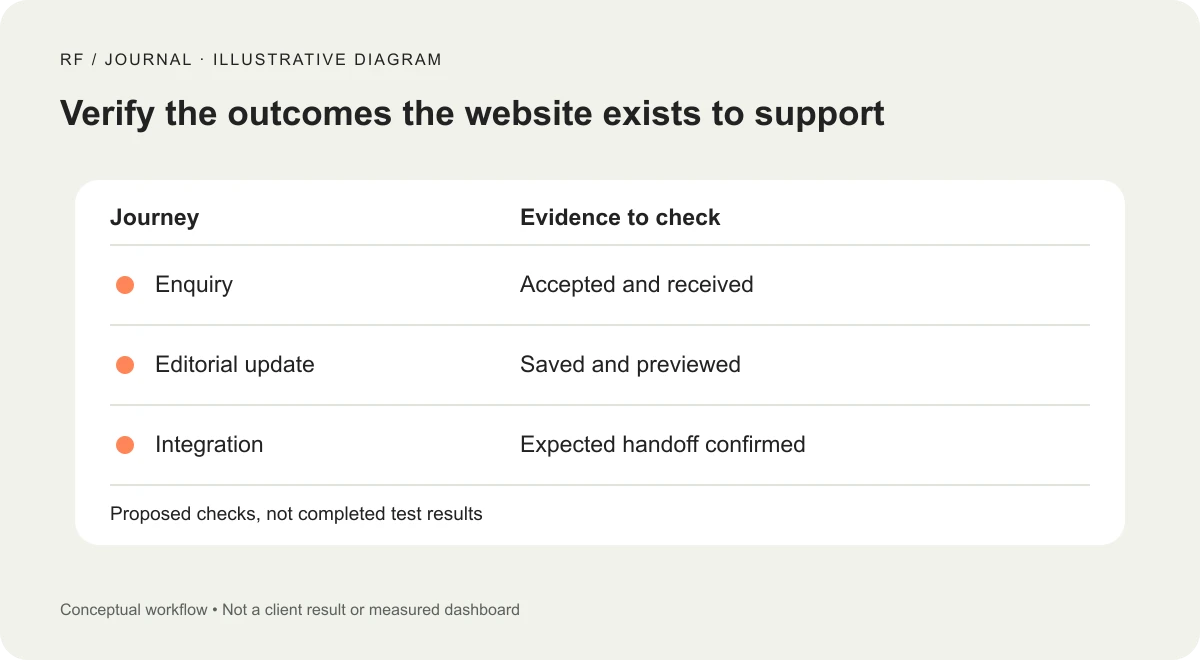
Illustrative workflow, not a client result or completed test.
Run a short, meaningful verification pass
Build the checks around the journeys identified at the start. For a fictional service company, the following is a proposed release checklist rather than completed test evidence.
| Journey | Proposed check | Evidence to retain |
|---|---|---|
| Public page | Open representative templates outside the admin session | URL, viewport and visible outcome |
| Enquiry | Complete an authorized test and confirm receipt | Test identifier and receiving-system result |
| Validation | Trigger the agreed invalid case and recover | Error behavior and retained information |
| Search | Run a relevant query and open a result | Query and destination |
| Editorial work | Edit and preview an agreed test item | Editor action and resulting preview |
| Integration | Verify the connected handoff through its test route | Request or system outcome without private data |
The purpose is not to accumulate screenshots. Each check should answer whether a required behavior survived. Store only the information needed to reproduce or understand the observation, with sensitive information kept out of shared release notes.
Inspect the states a homepage glance misses
Check the form while it is submitting, after a validation error and after acceptance. A successful visual confirmation should correspond to an accepted action, not just a timer finishing in the browser.
For commerce, define safe test arrangements with the store owner and payment provider's relevant guidance. Product selection, totals, shipping availability and the order outcome are different checks. A working add-to-cart button does not establish that a payment journey succeeds.
Inspect mobile layouts and keyboard interaction on the components the update may affect. An updated dialog can look correct while changing focus behavior. A new style can preserve the desktop view and break a narrow card or form.
Record unexpected changes even if they do not block the release. A small layout shift, missing message or altered editor control may explain a later support question. Distinguish those observations from verified defects and unresolved suspicions.
Check caches and the anonymous experience
After release, inspect the public website without relying only on a logged-in view. Cached pages and optimized assets can differ from the resources an administrator sees.
Use the cache controls appropriate to the setup and verify the result. Do not assume that clearing a WordPress page cache also clears every browser or external delivery layer. If the old interface remains visible, identify which resource or cached response is being served before repeatedly changing unrelated settings.
Check one representative updated page and an important action after the cache refresh. If a script and its matching markup are delivered from different versions, a page may appear intact while interactions fail.
The release record should describe the actual cache action taken, not a standard sentence copied into every report. A requested purge and a verified public result are separate observations.
Make automatic updates an owned process
Automatic updates can handle installation work, but someone still needs to own monitoring and verification. Decide which components use them and what happens when an update attempt or an important journey check fails.
WordPress documents controls and notifications for plugin and theme auto-updates. Confirm the behavior of your actual installation and hosting environment instead of assuming the default settings are active or every notification reaches a monitored inbox.
Choose a verification method proportional to the site's needs. A small brochure site may use a short scheduled manual pass. A more transactional site may need appropriate automated checks and a defined response. Describe what the checks actually cover; an uptime monitor alone does not test enquiry delivery or order correctness.
Avoid making one person the invisible dependency. If notifications are sent only to an account nobody else can access, document the handover before that person takes a holiday.
Close the release with a useful note
Save the changed components, versions, date, completed checks, known limitations and recovery reference. Identify who reviewed the outcome and avoid writing “tested” beside a journey that was never exercised.
If a problem appears later, use the note to narrow the investigation. Compare the observed failure with the changed components and retained evidence. Do not assume the most recent update caused every issue, but do not dismiss a plausible connection without checking it.
When repeated maintenance exposes a deeper dependency problem, step back from the update screen. Our CMS selection guide discusses fitting a platform to the team's work; our migration planning guide covers the broader changes that routine updates cannot resolve.
Start with a list of the website's essential actions and the evidence that would prove each still works. The next update session then has a clear finish line: the business journey has been checked, rather than the dashboard simply looking quieter.
Visuals: AI-generated cover with fictional objects and interfaces, plus an original illustrative workflow diagram. No client screenshots or measured results are depicted.


