
A language switcher can make a website look ready for another market while the form still sends an English confirmation, the service page describes the wrong region and the sales team cannot respond to the enquiry. Translating the visible paragraphs is important work. It is not the whole publishing process.
For Webflow localization, plan the source content, local adaptations, CMS relationships, URLs, metadata and customer journey together. Give each locale a reviewer and verify the published result, including the action a visitor takes after reading. Launch a coherent small set of pages before expanding the translation queue.
This is a proposed workflow for a fictional professional-services website with English and Spanish content. It is not a client case study or a claim that RichFolds performed a multilingual audit. Official Webflow documentation was checked on 19 October 2026; confirm features against the intended account and plan.
Decide whether the business is ready to serve the locale
Start with the audience and the service, not a list of languages that would look good in the header. Which visitors need the localized content? Can the team handle enquiries in that language? Does the service described apply in the relevant location?
A language and a market are not interchangeable. Spanish-language content can serve people in different countries with different expectations. Decide what your selected locale represents rather than using a flag as a shortcut for the entire audience.
For the fictional services firm, the initial goal might be to explain an existing service clearly to Spanish-speaking customers in its current US service area. That is a more specific scope than announcing international expansion because the website has acquired another menu item.
Write down what remains unchanged and what must be adapted. The underlying service may stay the same while examples, terminology, contact instructions or availability need local review. Those decisions determine the publishing work.
Build a page inventory around one complete journey
List the entry page, service detail, supporting information, enquiry form and confirmation that a visitor needs. Include navigation labels, footer links, validation messages and linked documents. Small pieces often escape the translation spreadsheet because they do not look like pages.
Identify the minimum coherent launch set. Publishing a translated homepage that routes immediately into unsupported content can disappoint the intended audience. It may be better to publish fewer complete journeys and explain clearly where another language is used.
For each item, record its source owner, local reviewer, status and dependencies. A service page may depend on an approved description, a relevant photograph and a working form. That is more useful than a single translated checkbox.
Prioritize by reader need. Important eligibility and contact information should not wait behind decorative brand copy simply because the latter is easier to translate. The inventory should reflect the decisions customers need to make.
Confirm the locale setup before importing content
Webflow's locale-management documentation describes language, optional country, display settings, subdirectories and publishing status. It also notes plan requirements for secondary-locale publishing. Check these in the intended project before committing the content team to a structure.
Choose a primary locale deliberately. Do not assume it can be casually swapped later to correct an early planning mistake. Record the intended language and region model and review it with the people responsible for the site.
Check URL conflicts. Webflow warns that a locale subdirectory conflicting with a Collection, folder or page can result in a 404 for that content. Inspect the existing site map before selecting short paths that are already in use.
Keep the locale model in the project documentation. A developer, editor and local reviewer should be able to identify what each locale represents and whether it is intended to be published. Preview availability alone is not a launch decision.
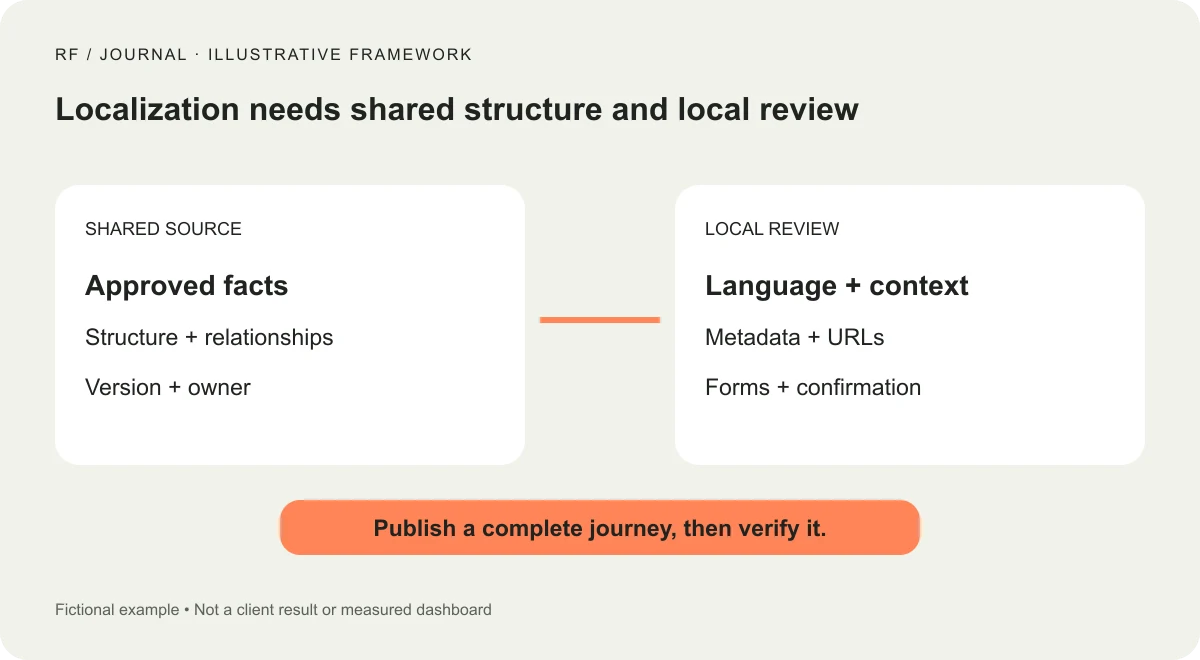
Conceptual editorial process. The language panels are fictional examples, not a client website.
Separate shared structure from locally reviewed meaning
Some fields represent shared facts, such as a staff member's identity or an internal service reference. Other fields carry the local explanation. Decide which information should be maintained centrally and which needs review in each locale.
Do not duplicate entire records merely because the first translation felt easier that way. First understand how the CMS and localization features model the content. Unnecessary duplicates can create inconsistent updates and confusing relationships later.
Webflow's CMS localization lesson demonstrates localized Collection content and locale-specific visibility. Use the current product behavior as the implementation reference, then test it with your actual Collection relationships and templates.
Try a representative item with a longer title, several reference fields and an image. Verify the list card and detail page together. A translated item that looks correct in an editing panel may still inherit a label or link that belongs to another locale.
Use machine translation as a draft with a defined reviewer
AI-assisted translation can provide a useful starting point. Give the reviewer approved terminology, the intended audience and the context of the service. A fluent sentence can still describe the wrong thing when the source term is ambiguous.
Ask the reviewer to check meaning, not only grammar. Does the translated service claim match what the business offers? Is the call to action appropriate? Does the customer understand whether they are requesting information or making a confirmed booking?
Keep unsupported claims out of both versions. Translation should not invent a certification, a service area or a guarantee. If the source is unclear, resolve it with the business owner rather than asking the translator to choose the most flattering interpretation.
Record the reviewed version. When the source changes later, mark the affected locale for review. A translated field that still contains words is not necessarily current. The workflow needs a way to distinguish present from approved and up to date.
Review metadata and shared previews separately
Webflow's page-settings documentation describes localizing page slugs, SEO fields and Open Graph settings, with some features depending on the plan. Include these fields in the review rather than treating them as invisible technical leftovers.
Write a title and description that accurately represent the localized page. Do not translate a keyword mechanically if the result fails to describe the service naturally. Keep the page's promise consistent across the search preview and visible heading.
Inspect a shared link preview where practical. A Spanish article paired with an English promotional image may still be usable, but it should be an intentional choice. If the image includes essential text, provide an appropriate alternative or adapt the asset.
Check the published URL and links after a slug change. Keep a record of old and new paths when planning a move, and use the platform's supported redirect process where required. Do not assume changing the visible language label updates every linked destination.
Localize the enquiry experience through confirmation
Complete the actual form in the selected locale using controlled test data. Inspect field labels, help text, required-field errors and the confirmation. Check that the receiving team has enough context to respond appropriately.
Decide whether the submission should include a locale identifier. That can help routing and response preparation, provided it is handled appropriately in the integration. Do not infer a person's preferred language solely from a geographic address.
Review the automated email as well as the browser message. The website may present a localized confirmation while the email uses a default template. The whole interaction should explain the next step accurately.
If the business cannot support a fully localized response, say what the customer can expect. A clear explanation is more respectful than inviting an enquiry under a promise the team cannot fulfill.
Test layout with the actual translated content
Longer words and different sentence structures change the layout. Inspect navigation, buttons, cards and headings on a narrow screen. Avoid shrinking text until every translation fits the original English box.
Review line breaks and the hierarchy of conditions. A disclaimer that wraps into an unreadable strip is not fixed by declaring the page responsive. Give the content enough space and adjust the component where needed.
Our small-business design system guide explains why content rules belong with reusable components. Localization is a useful test of those rules: the interface must tolerate meaningful variation while preserving the task.
Check image descriptions and meaningful interface labels. The page's language should not stop at the visible paragraph text. Include a reviewer who understands the intended audience and accessibility needs; a quick visual pass is not a complete multilingual accessibility audit.
Keep publication and review status visible
Use an editorial board or a simple register with explicit states: awaiting source approval, translation draft, local review, ready to publish and verified live. Do not combine these into one percentage that hides unfinished customer-facing steps.
Give publication authority to the appropriate people. The business should know who can release a locale, who reviews service claims and who handles technical settings. Available permission controls depend on the setup, so confirm the intended arrangement.
After publication, inspect the public site while signed out. Follow the switcher, open a localized CMS item, use a direct link and complete the agreed test journey. Verify that the pages you intended to launch are actually available.
Record any deliberate gaps. If a linked document remains in English, identify that clearly and assign a review decision. A visible limitation is easier to manage than a hidden assumption that everything was translated automatically.
Plan the second update before adding the third language
Choose one realistic source change and rehearse it. Update a service detail, identify affected content, adapt the locale and republish the reviewed result. This exposes maintenance problems that a one-time translation import can conceal.
If the team cannot reliably update two locales, adding several more will multiply the queue. Improve ownership and content structure first. Our CMS selection framework can help evaluate whether the broader operating model fits the people maintaining it.
Do not claim a search or enquiry improvement merely because the localized pages are live. Record publication, availability and completed checks separately from later audience outcomes. The initial success condition is a coherent, accurate journey the business can maintain.
Start with one complete customer task in one additional locale. When the source, translation, review and publication steps are clear, the language switcher becomes the entrance to a useful experience rather than the decoration that arrived before the process.


