

A Black Friday landing page has one important job: help the right customer understand the offer and complete the purchase under the conditions you actually intend. The giant headline is optional. A discount that survives the journey into checkout is less optional.
Start with an agreed offer, build a page around the products it covers, and verify the path from the actual campaign link to the resulting order. Include the exceptions: an excluded product, a changed quantity, a different address and a visit after the offer ends. Those cases reveal gaps that a polished desktop preview cannot.
This guide is a practical planning framework for a fictional camera-accessory store. It is not a report of a client campaign or a conversion result. Documentation was checked on 19 October 2026. The advice applies to a campaign you are preparing; it does not assume your store should run a particular promotion.
Write the offer in a form the whole team can use
Before the design, write one plain-language description of the offer. Identify the included products, the audience, the method of redemption, the opening and closing times, and any restrictions. Have the responsible business owner confirm those decisions.
For the fictional store, imagine an offer on selected camera bags. The brief should say whether a customer needs a code, whether every color is included, and whether another existing discount may combine with it. Do not leave those questions for a designer to answer through a small-print paragraph.
Record the time zone alongside the schedule. An internal note saying the offer ends at midnight is incomplete when the team, store settings and audience use different clocks. Decide which schedule controls the discount and how the customer-facing wording explains it.
Keep a single approved reference for the offer. The email, ad, page, support reply and checkout configuration should derive from it. A campaign becomes hard to manage when the most recent decision lives in whichever message somebody remembers reading.
Choose the page's audience before its layout
A returning customer who knows the product needs different help from a first-time visitor arriving through an unfamiliar ad. Identify the intended audience and the question that might prevent them from buying.
For a camera bag, useful questions include fit, dimensions, what is included and how to choose between sizes. Show evidence and accurate product details. Avoid filling the page with unrelated brand statements while forcing the customer to leave for basic compatibility information.
Build a route into the appropriate products. A collection can work for several alternatives; a focused product page may suit one clear offer. The important decision is whether the destination helps this audience choose, not whether it qualifies as a separate campaign page.
If different ads promise different products, confirm where each lands. Sending every campaign to the same broad grid may make reporting tidy while leaving customers to rediscover the product that attracted them.
Put the useful conditions near the decision
Explain what the customer receives and how to redeem the offer close to the main action. Make exclusions understandable before the customer builds a cart. Avoid using a large promise and a distant qualification that changes its meaning.
For the fictional bag offer, show the eligible range and clarify whether the saving appears automatically or requires a code. If accessories in the photograph are not included, make that clear. Product imagery should help interpretation rather than quietly expand the promise.
Keep delivery and returns information accessible. A campaign page should not replace the actual store policy with a shortened version that contradicts it. Link to the relevant detail and state the immediate information the buyer needs.
Do not add a resetting countdown, invented stock pressure or an unsupported biggest-sale claim. Honest urgency comes from a real schedule or an actual availability constraint. If you cannot verify the condition, it does not belong in the design.
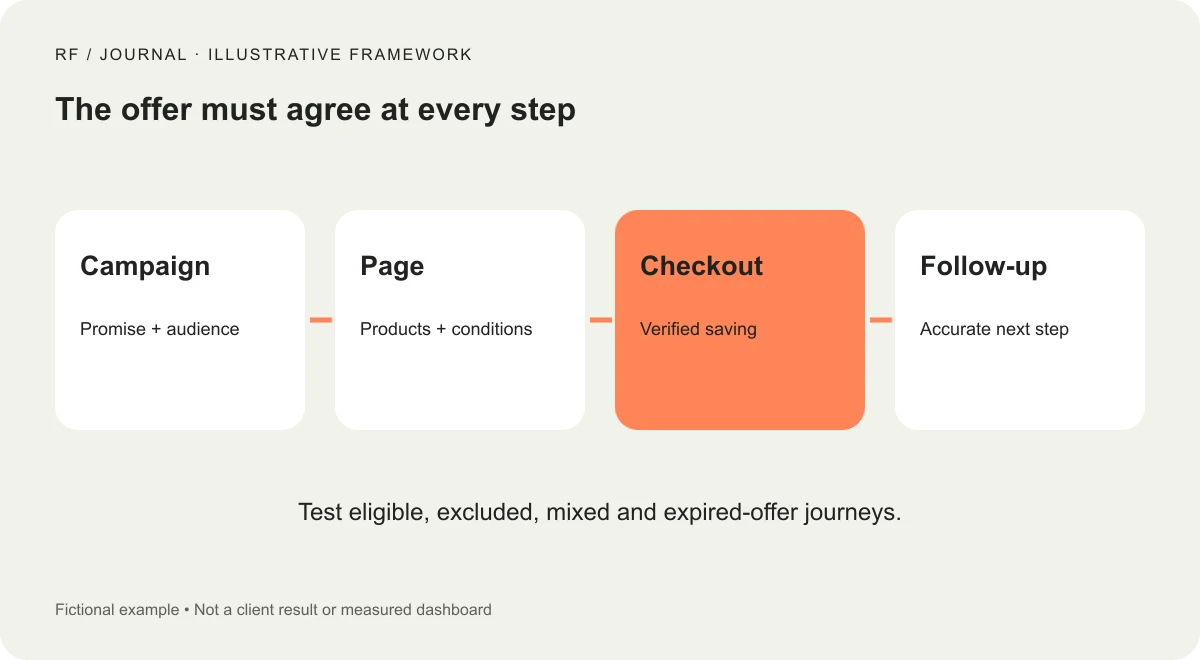
Conceptual campaign framework, not a measured sales funnel or client result.
Treat discount configuration as part of the content review
Shopify's discount documentation distinguishes discount codes, automatic discounts and sale pricing. Confirm which method the campaign uses. The page wording should describe the configured behavior rather than a designer's assumption about it.
Check interactions with existing promotions. An automatic discount, a welcome code and a shipping offer may not behave as the customer expects. Shopify documents discount-combination conditions; verify the actual eligible combinations in the intended store.
Keep the public explanation simple, but keep the internal test specific. Add an eligible item, an excluded item and a mixed cart. Check the amount, the reason a code is rejected and the message the customer sees.
Use the platform's supported testing process and controlled test data. A review does not need to create unintended live charges. Record what was verified before payment and which end-to-end test still needs an authorized test-order route.
Rehearse the campaign link, not a convenient preview
Open the exact destination used by the planned email or ad. Confirm the correct page, expected campaign parameters and any code-application behavior. A working preview URL does not establish that the scheduled campaign points to it.
Check links on mobile and in a fresh browser session. Existing cookies or a staff login can hide a problem that a first-time buyer encounters. Verify the signed-out experience and the actual public destination.
Walk into a product, choose a variant, change the quantity and return to the campaign page. If the customer loses important context, improve the navigation or the explanation. Do not make the offer depend on remembering a detail from the first screen.
Shopify's campaign-planning guidance includes checking destinations, discounts and support preparation. Use that as a preparation prompt, not proof that a particular design or schedule will increase your sales.
Make sold-out and unavailable states useful
Popular items can become unavailable while ads continue running. Decide how the page handles that state. It might show an accurate alternative, explain availability or stop promoting the item through the relevant campaign process.
Do not redirect to a different product while leaving the original promise unchanged. A customer attracted by a specific bag should understand if the item is unavailable and whether the alternative has different conditions.
Check unavailable variants as well as whole products. A card may display a starting price or image for a version that cannot be purchased. The customer should be able to identify an available option without repeatedly discovering exclusions at checkout.
Give someone responsibility for monitoring this during the campaign. The page can only reflect the business accurately if changes in stock and campaign activity have an owner.
Review mobile decisions, not just mobile appearance
Use a narrow screen to choose a product and interpret the offer. Check whether the main action, variant controls and conditions remain visible and readable. Long titles and error messages deserve real content, not short placeholders.
Inspect overlays together. A cookie interface, sale banner and email sign-up can each look reasonable in isolation while collectively covering the product. Keep the purchase task usable and ensure dismiss controls work with the keyboard and touch.
Avoid turning the campaign page into a heavy gallery. Deliver appropriately sized images and verify that important content appears without waiting for decorative assets. A different campaign should not require a completely separate performance strategy from the rest of the store.
Read the confirmation as a customer. If it implies guaranteed delivery or a reservation that the business has not made, correct the message. Presentation and fulfillment need to agree.
Verify measurement before campaign traffic arrives
Define the events needed to understand the journey. A product click, checkout start and completed order are different observations. Do not count a payment-button click as a completed purchase.
Use controlled tests to check that relevant events are recorded appropriately and that repeated page views do not create duplicate business outcomes. Respect the site's actual consent setup when interpreting missing analytics data.
Record the campaign and offer changes alongside the measurement. If the discount, audience and page all change, do not attribute the entire difference to one headline. Our GA4 measurement guide explains why definitions and verification should precede a performance conclusion.
Avoid declaring an A/B test winner from a few early orders. If a formal experiment is not justified by the available traffic and setup, run a clear campaign review instead. Operational evidence is valuable without being dressed as a statistical result.
Prepare support for the same offer the page describes
Give the support team the approved offer brief and the public links. Include useful responses for excluded items, code conflicts, delivery questions and purchases made near the campaign boundary.
Set an escalation route for a mismatch between the page and checkout. Staff should know who can inspect the configuration and who decides how to resolve a customer issue. The person answering the message should not have to invent a commercial exception under pressure.
Check the delivery wording with operations. Our delivery-estimate framework separates preparation and transport from the customer-facing promise. Campaign copy should use that same discipline rather than borrowing a deadline from a different product or region.
Keep the support queue visible during the campaign. Repeated confusion about the same condition is evidence that the page needs attention, not simply a reason to create another canned reply.
Plan what the page says after the offer ends
Decide the closing state before launch. Update the headline, controls and campaign destinations so a late visitor does not follow an expired promise through several screens. Keep useful product routes available where appropriate.
Review scheduled emails and active ads against the closing plan. A store page that has reverted correctly can still receive misleading traffic from an outdated message. The campaign ends across channels, not only inside the theme editor.
Keep a record of the actual offer and the checks performed. Afterward, separate operational issues, customer questions and measured outcomes. That review creates a better starting point for the next campaign than copying the page and changing the year.
Begin with one offer and test one complete journey. When the advertised promise, page conditions and checkout result agree, the design can do its job without asking the customer to solve the campaign's internal disagreements.


