

You open Google Analytics, look for the big “make this website better” button, and discover several menus instead. Somewhere between a custom dimension and a meeting about dashboards, the original question gets lost: did the change help customers complete the task?
Here is the useful distinction. Your experiment system decides who receives each version and delivers that experience. GA4 can help you examine the resulting behavior. Collecting an event does not itself split traffic, keep a visitor in the same version or tell you when the evidence is strong enough to ship a change.
This guide explains how a small website team can plan that connection without mistaking an analytics chart for a controlled experiment. It is a documentation-based implementation guide, checked on 17 October 2026, with a fictional example. It does not report a test run by RichFolds or recommend one paid testing product for every site.
Start with a decision, then choose the tools
Suppose a service company wants more useful enquiries. The current page has a broad contact form. The proposed version adds a short explanation of what information helps the team respond. The decision is whether to keep that explanation, not whether a new paragraph can collect more clicks.
Write the question in plain language: “Does explaining what to include help eligible visitors submit useful enquiries without adding friction?” That sentence gives the designer, developer and person answering enquiries a shared objective.
Then describe the experiment's responsibilities. Something must assign visitors, render the correct version, keep the assignment consistent for the intended unit, record exposure and collect the outcome. A reporting system must let the team compare meaningful groups. These responsibilities may be spread across products, but they cannot be left unowned.
For background on hypotheses and success criteria, read our guide to planning a trustworthy A/B test. This article concentrates on the measurement connection rather than repeating the full planning process.
GA4 is part of the measurement architecture
Google's A/B testing documentation describes using a third-party experimentation tool to run and manage tests, with Analytics used to interpret their results. This is the simplest starting distinction for a merchant or business owner choosing a setup.
A team with an in-house framework has another route. Google's experiment integration documentation also describes recording custom experiments through client-side events and registered dimensions. That does not turn GA4 into the framework that assigns and renders variants. Your implementation still needs to supply those behaviors.
Before purchasing anything, ask the developer to draw the actual chain for your site. Identify the assignment system, the page-rendering method, the exposure signal, the conversion source and the analysis owner. A collection of installed tools is not an architecture until the handoffs are clear.
Assignment and exposure answer different questions
Assignment means the visitor was allocated to a version. Exposure means they reached the relevant experience under the rule you defined. For a change below the first screen, those populations can differ.
Decide which population answers your question before the test starts. If the goal concerns everyone entering a landing page, an analysis restricted to people who scroll to a panel can describe a different question. If the goal concerns an eligible product interaction, the eligibility and exposure conditions need to be explicit.
This distinction also matters when something fails. A visitor can be assigned to version B while a script error leaves them seeing version A. An allocation log alone would miss the mismatch. Record enough operational evidence to detect it without collecting unnecessary personal information.
Use stable, readable labels. “contact_guidance_v1” is easier to maintain than “test_new_final_reallyfinal.” Store the exact variant definition beside the label so a future analyst knows what “B” meant after the design file has changed.
Define a measurement contract
The contract is a short agreement between the people building the test and the people interpreting it. It states what an event means and what it does not mean.
| Item | Example decision for the fictional contact test |
|---|---|
| Experiment identifier | A stable ID for the contact-guidance test |
| Variant labels | Control and guidance, with a saved definition |
| Eligible population | Visitors reaching the specified page under the agreed rules |
| Exposure rule | Defined point at which the experience counts as received |
| Primary outcome | Successful eligible enquiry submission |
| Quality check | An agreed, separately assessed enquiry-quality rule |
| Guardrails | Submission errors and an agreed measure of added friction |
These labels are an illustrative plan, not a drop-in GA4 schema. Keep the meaning consistent with the experiment provider's integration or your own documented event contract.
Google's provider integration and its in-house example use different event patterns. Follow the path that matches your implementation rather than copying both into the same tag manager. Sending two exposure events because two tutorials each looked convincing is a surprisingly efficient way to manufacture confusion.
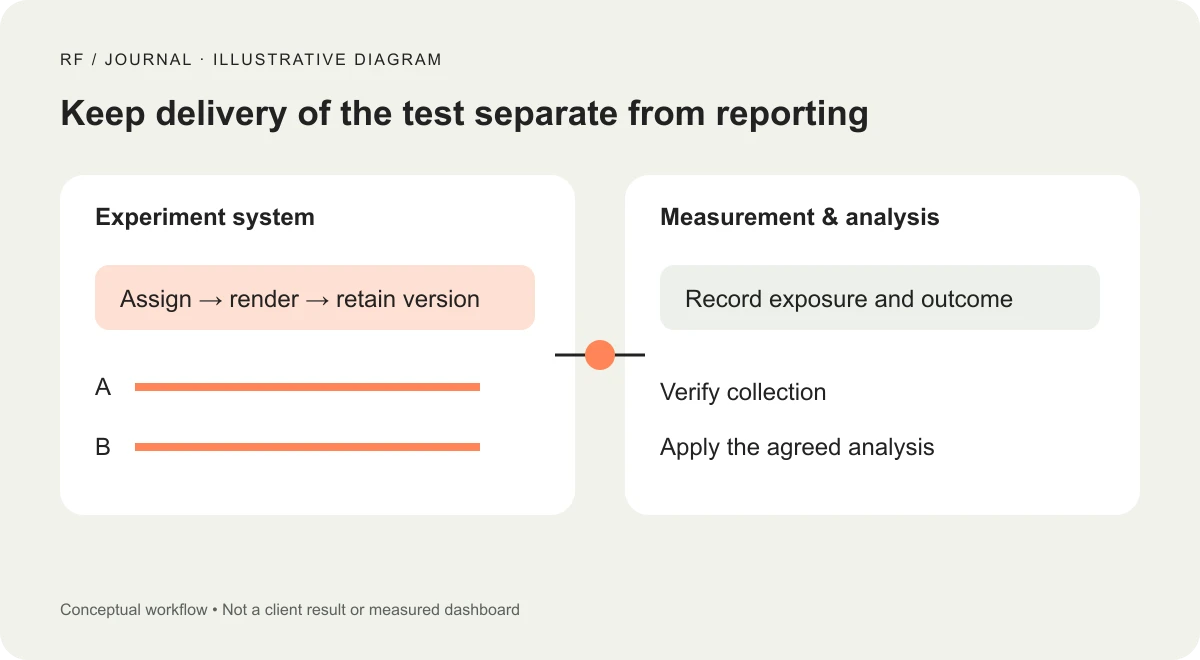
Illustrative workflow, not a client result or measured dashboard.
Choose the outcome that survives a design change
For the contact example, clicking the submit button is weaker evidence than the application accepting the enquiry. A click can be followed by validation failure, a network error or a second click while the first request is pending.
Choose the accepted outcome your system can actually observe. If the form submits asynchronously, decide where the accepted-submission signal originates and how retries are handled. If a thank-you page is used, check whether revisiting it can create duplicate outcomes. Document what happens when the server accepts a submission but the browser never receives the response.
The same reasoning applies to ecommerce. Adding an item to a basket and completing an order answer different questions. A design might encourage exploration without changing purchases. That can be useful, but the report must name the behavior it measured.
Do not send form text, customer email addresses or enquiry details into experiment parameters. Keep identifiers descriptive of the test, not the person. Assess consent and data handling against your actual setup instead of assuming a testing integration inherits every setting automatically.
Make custom data reportable before the launch
Sending an event parameter and making it convenient to analyze are separate setup tasks. Google's custom-dimension guidance explains how collected custom information is made available through definitions. Plan the needed definitions before the experiment rather than discovering the reporting gap on the morning of the results meeting.
Keep the parameter set small. Ask what each field allows someone to decide. A stable experiment identifier and a variant label have a clear purpose. A unique random label for every interaction can produce a report full of rows without producing understanding.
Check the scope of the definition and what it represents. An event-level label and a persistent user attribute are not interchangeable. Ask the integration owner to explain how conversions later in the journey remain associated with the intended experimental group in the chosen analysis.
Avoid promising that a newly registered field will instantly appear everywhere or reconstruct every past interaction. Allow time for processing and verify the actual reports. The concrete launch criterion is that the planned comparison can be produced from the data your setup collects.
QA the experiment as a user journey
Create a small checklist and retain the observations. First, confirm which version a test visitor sees. Navigate away and back according to the intended persistence rule. Refresh. Follow the normal route to the outcome. Check a second page template if it shares the modified component.
Next, inspect exposure and outcome collection. Google's DebugView documentation provides a way to inspect incoming debug activity. Use this to investigate the event sequence, then verify the reporting path separately. Seeing an event in a debugging tool is an important check, not proof that the final comparison is valid.
Test validation failures, interrupted requests and repeat actions. If your form has a loading state, confirm that a second click does not create a second accepted submission. If a browser blocks a measurement request, record the limitation rather than silently treating the visit as fully observed.
Also inspect visual delivery. A late swap between versions can be confusing, and a script that delays the buying controls may change the experience beyond the intended copy test. The experimental treatment is whatever visitors actually receive, including accidental loading behavior.
Agree on the analysis before looking for a winner
Decide the analysis method, practical effect worth detecting, required sample and stopping rule with someone competent in the chosen statistical approach. There is no honest universal instruction to “run every test for seven days.” The needed evidence depends on the question, baseline behavior and method.
During the experiment, monitor whether allocation and collection behave as planned. An unexpected split between groups should trigger investigation. A sudden change in consent behavior, a broken form or a campaign routed only to one version can undermine a tidy-looking comparison.
Separate operational monitoring from repeatedly searching for a favorable result. The ability to refresh a dashboard does not mean each refresh is a new valid decision point. If the experiment tool supports a particular sequential method, understand its rules and use them consistently.
Report uncertainty and business relevance together. A change can be too small to justify ongoing complexity, even when a statistical procedure detects a difference. An inconclusive result can still reveal that the planned test could not answer the question with the available traffic.
What to do when traffic is limited
Do not stretch a tiny experiment into a confident story. Consider whether a moderated usability session, a focused accessibility check or an inspection of real support questions would answer the immediate problem more efficiently.
For the fictional form, watching suitable participants explain what they think the company needs could reveal unclear language before any traffic split. That is qualitative evidence about comprehension. It does not establish an uplift, but it may produce a better treatment to test later.
You can also fix an objectively broken interaction without presenting the repair as an A/B-test victory. If the submit button is inaccessible to keyboard users, the first task is to correct the defect and verify the interaction.
Keep a decision record when the test ends
Save the dates, eligibility, actual variant definitions, collection checks, interruptions, analysis method and decision. Include the reason for keeping, removing or revising the treatment. “B won” is not enough for the next person maintaining the page.
Archive obsolete implementation code and confirm the final page no longer depends on an expired experiment configuration. Check the live form after rollout; deploying the selected version introduces another opportunity for an integration mistake.
The practical first step is small: write the measurement contract for one question and ask the implementation owner to trace one test visitor from allocation to outcome. If that trace is unclear, fix the connection before spending a month collecting data you cannot confidently interpret.
Visuals: AI-generated cover with fictional objects and interfaces; original illustrative workflow diagram. No client screenshots or measured results are depicted.


