
A client asks whether a different editing layout would help. You could turn the discussion into a long presentation, or you could give them a small working example and ask them to complete the task.
WordPress Playground can be useful for that second approach. It runs WordPress in the browser, making it suitable for focused demonstrations and experiments. The important decisions are what the demo is meant to prove, how its useful work will be saved and what still needs testing in the real hosting environment.
Treat Playground as an experiment with a defined scope. A convincing browser demo is not evidence that production email, payments, integrations and hosting will behave identically. This guide proposes a client-demo workflow using current WordPress documentation checked on 22 October 2026.
Give the demo one job
Choose a question that a short interaction can answer. For example: Can an editor replace a service image, update a price label and preview the page without disturbing the layout?
That question is more useful than “Does the client like WordPress?” It produces observable tasks and a clearer discussion. The client can point to an unfamiliar label, a missing field or an awkward preview step.
Write a small demo brief containing the task, example content, expected outcome and exclusions. Use fictional or approved content. A demonstration does not need a copy of every real customer record to explain an editing screen.
Keep the environment small enough to understand. Adding ten unrelated plugins may make the demo appear comprehensive while making it harder to identify which feature is responsible for a problem.
Decide what must survive the session
The current Playground limitations documentation distinguishes autosaved, saved and temporary Playgrounds. When browser storage and saving are available, recent Playgrounds can be autosaved; those recovery points are not a substitute for a long-term backup. A deliberately temporary Playground can be discarded when its tab closes or the browser refreshes.
That is why two blanket statements are both unhelpful: “Everything disappears immediately” and “The browser will keep it forever.” Storage depends on the chosen mode and the browser context.
Before the client edits, choose how the useful result will be preserved. A saved Playground can help continue work in its supported storage context. An exported ZIP gives a portable artifact to retain separately. Browser storage can still be removed by profile changes, cleared site data or other storage conditions.
Tell the client what to expect in plain language. “This is a temporary practice site; we will export the approved example before ending” is clearer than assuming they understand browser persistence.
Use a Blueprint for the repeatable starting point
Playground Blueprints describe a way to configure a Playground through a structured setup. They can help a team create a repeatable demonstration instead of remembering a sequence of manual installation steps.
For the proposed editing demo, the setup specification might identify the WordPress environment, approved theme, required plugin and example page. Keep a human-readable note beside it explaining the purpose of each dependency.
A repeatable starting point is different from a saved edited result. The Blueprint helps establish the initial experiment. An export preserves the particular state you decide to retain. Store both when the project needs both.
Do not put credentials or confidential content into a publicly shared setup link. Review all referenced assets and configuration before sharing. A convenient demo URL should not become an accidental delivery mechanism for private project information.
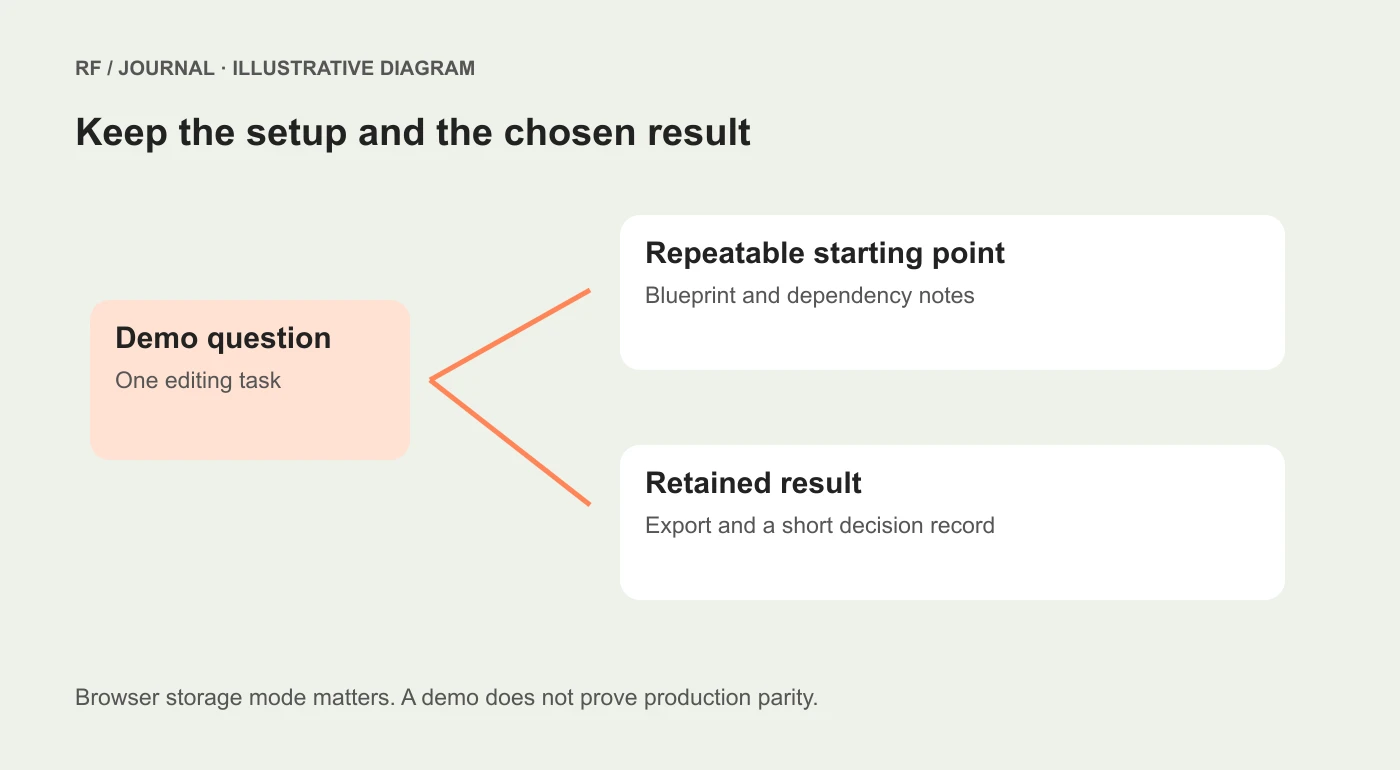
Conceptual demo workflow, not evidence that a Blueprint or client export has been executed.
Observe the editing task without narrating every click
Give the reviewer the task and let them attempt it. If the developer explains every field immediately, the exercise measures the developer's ability to guide the interface rather than the interface's clarity.
Record where help was needed. Did the editor understand which image was decorative? Was the field label meaningful? Did the preview show the intended change? Could they recognize when the edit had been saved?
Avoid turning hesitation into a judgment about the person. A confusing field name is a design problem worth improving. The point is to learn which parts of the workflow require clearer structure or instructions.
At the end, ask the reviewer to explain what they changed and where they would go next time. That explanation can reveal uncertainty that a successful click sequence hides.
These are proposed research tasks. If you later publish findings from a real session, record the method, permission, participant context and limitations rather than presenting a fictional demonstration as a case study.
Keep demonstration evidence separate from production evidence
Use an explicit boundary table during the project handover.
| The demo can help investigate | The real environment still needs to establish |
|---|---|
| Field names and editing sequence | Roles, permissions and access configuration |
| Example template structure | Compatibility with the deployed theme and extensions |
| A small plugin interaction | Hosting limits and the full integration setup |
| Content presentation | Production caching and delivery behavior |
| A proposed editor workflow | Backup, recovery and support arrangements |
The right-hand column is not an accusation that the demo is unreliable. It identifies questions that were outside the experiment. A clear boundary makes the demonstration more credible.
For example, showing a contact form interface is not proof that production email delivery works. Showing an ecommerce product layout is not a completed payment-gateway test. Give those tasks their own environments and acceptance criteria.
Export with a short readme
When retaining the result, save a dated export and a concise note. Include the demo question, environment assumptions, dependencies, changes worth keeping and known exclusions.
If the reviewer selected a field arrangement, record that decision separately from the export. The developer who receives it should not have to compare several archives and guess which one contains the approved version.
Also record how to recreate the initial state. If a dependency was updated after the original session, a later run may differ. A reproducible setup reduces uncertainty, but it does not make upstream software immutable.
Store the artifact in the project's normal location with an owner and retention decision. “It is probably in somebody's browser” is not a handover process.
Move accepted decisions into a controlled build
Once the demo answers its question, transfer the accepted design decisions into the actual development workflow. That may involve rebuilding fields properly, adapting permissions or integrating the layout with an established theme.
Do not assume the entire demonstration should be copied unchanged into production. Practice content, experimental settings and convenient demo permissions may be inappropriate for a live site.
Use our CMS selection guide when the exercise is part of a platform decision. If the result leads to a real update or release, follow the WordPress business-journey checklist for focused production verification.
A sensible first experiment
Start with one editor, one representative page and one meaningful task. Establish the storage mode, prepare the content, observe the task and export the useful result. Then decide whether the evidence supports another experiment or a production implementation.
Playground is valuable when it shortens the distance between a proposal and something a person can try. Keep that advantage by defining the experiment clearly and preserving its result deliberately.
AI-assisted editorial guidance. Original illustrations are conceptual, not client evidence. Platform documentation checked 22 October 2026.


