
An orange warning in WordPress can make a perfectly ordinary morning feel like an unpaid incident-response shift. The temptation is to change the PHP version, clear every cache and hope the dashboard stops looking disappointed.
Start with a more useful distinction: a recommended PHP branch, an installed security patch and a working website are three different checks. Passing one does not settle the other two.
That matters right now. On 21 October 2026, the PHP project announced fixes for two critical vulnerabilities, CVE-2026-109618 and CVE-2026-109619. Its listed fixed releases are 8.2.35, 8.3.36, 8.4.27 and 8.5.12. These are release-specific details checked on 22 October, not a permanent list of the newest versions. Read the official PHP announcement and ask your host to confirm the applicable patched build.
For a WordPress business site, the immediate job is to establish what serves live web requests, confirm the security fix and check the journeys your business depends on. A green dashboard label is useful evidence. It is not a patch receipt.
What the October PHP update means for a website owner
The PHP advisory concerns the server runtime that processes requests. Updating a WordPress plugin does not, by itself, replace that runtime. Your host normally controls the PHP packages available to the website.
The project describes potential unauthenticated remote code execution. In ordinary language, that is a serious server-side security issue, not a cosmetic warning or a reason to wait until the next redesign. This article explains a maintenance response; it does not establish that any particular website has been attacked.
There are two important limits to a version-number check. A provider may apply vendor patches, and a control panel may describe a different environment from the one serving your domain. Get a domain-specific answer from the host rather than treating a dropdown selection as the final evidence.
The request is simple: identify the runtime in use, confirm whether the fixes apply to it, and state when the patched workers became active. If a provider relies on a backport, ask for its package or build reference and advisory confirmation. “We manage PHP” describes a service; it does not answer that question.
Why Site Health can approve the branch while a patch still matters
In WordPress, open Tools → Site Health → Info → Server to inspect the reported PHP version. The Status tab presents a different view: passed checks, recommendations and critical issues. WordPress documents both screens.
On 22 October, a read-only RichFolds studio review found the PHP branch classified as recommended. The same review showed separate plugin-update warnings and, on a subsequent run, a late scheduled task. Those observations were not a hosting patch audit. We did not establish the provider's security-patch status through that screen.
This is the useful lesson from the review: read what a check actually establishes before turning it into a broader claim. “Recommended version” should not become “every relevant security fix has been verified.” Equally, a pending plugin update should not automatically become “PHP is broken.”
WordPress currently recommends PHP 8.3 or higher. That is a platform requirement recommendation, not a promise about every release within a branch or every plugin on your installation.
Think of it like checking a car's model and checking its outstanding recalls. Both questions matter. The badge on the boot is not doing the recall inspection.
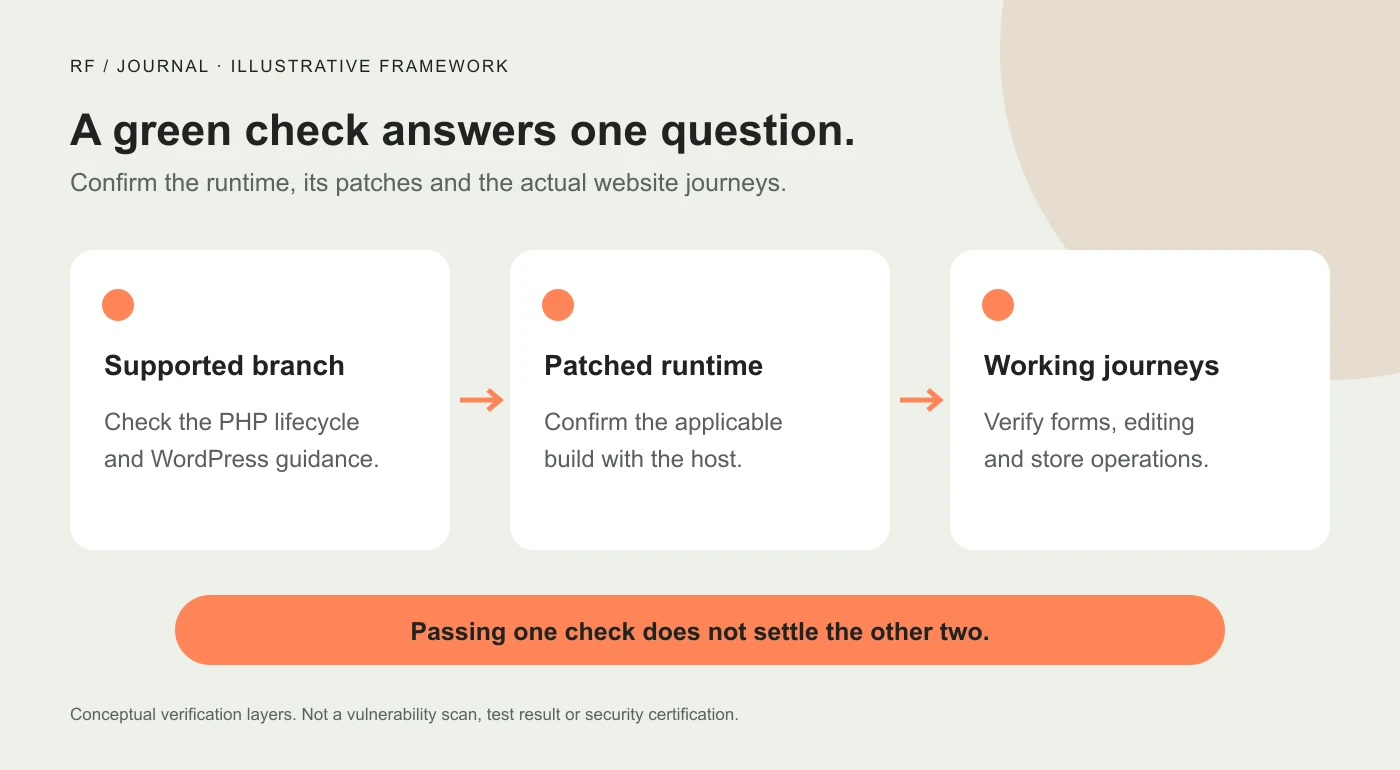
Illustrative verification framework, not a screenshot, vulnerability scan or security certification.
Keep the warnings in the right maintenance queue
Several different jobs can sit under the same Site Health heading. Give each an owner and a completion condition.
| Finding | First investigation | Useful completion evidence |
|---|---|---|
| PHP security advisory applies, or patch state is unknown | Host or server administrator | Applicable patched build confirmed for live web requests |
| A plugin has an available update | Site maintainer and plugin release notes | Update installed, relevant business journeys checked |
| A scheduled event is late | Task owner, queue status and runner | Cause investigated and subsequent execution observed |
| A default theme is missing | Site maintainer's recovery arrangement | A maintained fallback is available without replacing the live design |
| Persistent object caching is recommended | Hosting support and application configuration | A supported setup verified against the site's needs |
The table is a decision aid, not a diagnosis of every warning. It also prevents an expensive habit: making three unrelated changes, seeing one badge disappear and declaring the whole problem solved.
A security release deserves prompt attention even if the storefront looks fine. Conversely, installing a cache plugin will not establish that a PHP runtime is patched. Assign the work by the evidence, not by whichever button looks easiest to click.
Ask the host a question it can actually answer
Send a support request that names the domain and asks for a verifiable result. You can adapt this example:
Please confirm which PHP build currently serves web requests for our domain. Does it include the fixes for CVE-2026-109618 and CVE-2026-109619 from the 21 October PHP security advisory? If you use backported fixes, please provide the package/build reference and confirmation that the updated workers are active. Please also explain the supported update and recovery path for this site.
This is a sample message, not a support exchange we carried out. Replace “our domain” with the actual website before sending it.
Keep the response in the maintenance record. A timestamp, build reference and named domain are much more useful than remembering that somebody in support said everything should be okay.
If the host gives a broad fleet-wide statement, check whether it includes your account, server and relevant runtime. If it reports work still in progress, obtain the expected next confirmation. Do not mark the site patched just because a ticket exists.
Avoid forwarding passwords, private configuration files or customer information to make the request look technical. The domain and the precise question usually provide a better starting point.
Separate an urgent patch from a larger PHP migration
A security patch within the installed branch and a move to a different branch are different maintenance decisions. Discuss the smallest supported way to apply the security fix with your host. Do not turn an urgent patch request into an unplanned experiment across several PHP generations.
The current PHP lifecycle also matters for the longer-term decision. On the PHP support schedule, branch 8.2 reaches the end of its upstream security-support period on 31 December 2026. Branch 8.3 has security support through 31 December 2027. A supported branch still needs its applicable fixes; a lifecycle date does not install them.
For a larger migration, write down the current runtime, target runtime, active theme, critical plugins and custom integrations. Identify who can restore the previous configuration if compatibility fails. Keep a usable recovery copy of the files and database, with a recovery method somebody can perform. WordPress's PHP update guidance explains why compatibility checks and recovery preparation matter.
Preparation should support a prompt security response, not become a reason to leave a known fix indefinitely unapplied. If the site cannot safely make the change through its normal process, escalate that problem to the host and developer with a clear owner.
There is no useful prize for choosing the highest number in the hosting dropdown. The useful result is a patched, supported runtime that works with the application you actually operate.
Verify more than the homepage after the change
The homepage is often the least convincing place to stop testing. It may be cached, while the failure happens in an editor, upload handler, authenticated account or form submission.
Choose a short set of journeys before the maintenance starts. For a service business, that might be reading an article, opening the contact form, submitting an authorized test enquiry and checking the stored record. For a shop, it might include product selection, cart updates and a payment-provider-supported sandbox checkout.
Record what was checked and what remains untested. “The page opened” is different from “the enquiry was stored,” and both differ from “the acknowledgement reached the inbox.” Do not create real customer charges just to make a checklist look complete.
For each journey, use a small acceptance record:
- The page or action tested and whether the visitor was signed in.
- The expected outcome, such as a saved test record or an uploaded image.
- The actual outcome, time and environment.
- Any error identifier or restricted log reference needed for investigation.
- The person responsible for a failed or incomplete check.
This gives a developer something reproducible. A message saying the site “feels weird now” offers atmosphere, but very little diagnostic value.
For a fuller business-journey review, use our existing WordPress update checklist. This article adds the runtime-patch question; it does not replace the broader update process.
Treat a late scheduled task as its own investigation
In the studio review, Site Health later identified action_scheduler_run_queue as late. The warning tells us that a runner event was overdue at that observation. It does not identify the responsible plugin, prove that every queued job failed or establish that PHP caused the delay.
WordPress's default WP-Cron checks due work when page loads trigger it, rather than running continuously like a system scheduler. A site's actual scheduling arrangement may be different. That distinction is explained in the WordPress Cron handbook.
Where Action Scheduler is available, its administration screen lets a maintainer examine statuses and individual logs. Start with the affected hook, dates, recurring pattern and the component that owns the job. A pending status, a failed action and an in-progress action are different observations.
Before manually rerunning anything, understand the business effect. A job might send a notification, synchronize an external system or change a record. Pressing Run repeatedly is not a neutral debugging technique when the action has side effects.
The useful follow-up is evidence of normal subsequent processing and an explanation for recurring lateness. One warning disappearing on refresh is weaker evidence than a task completing and continuing on schedule.
What to do if an update exposes an error
Capture the affected URL or operation, time, expected behavior and the actual error. Keep detailed logs private; public error output can reveal information that visitors do not need.
Check which change preceded the failure. A plugin update and a PHP update made together create two plausible starting points. A documented sequence helps narrow the investigation without immediately disabling half the site.
If a runtime change must be reversed to restore service, involve the host in the security decision. Returning to an affected build is not a finished repair. You still need a patched, compatible path and an owner for implementing it.
For a persistent error, isolate the relevant component in staging or another appropriate test environment. Avoid deleting scheduled jobs, changing resource limits or adding a snippet from an unrelated forum thread just to silence the warning. If the failure concerns a payment or external integration, involve that provider before retrying operations that could duplicate work.
Our Core Web Vitals action plan covers performance investigation separately. This security update does not establish a measured speed improvement, a ranking increase or a conversion gain.
A useful maintenance outcome is a short evidence trail
At the end of the work, you should be able to answer four questions: what build serves the website, who confirmed its applicable security fixes, which business journeys were checked, and which separate warnings still need attention.
That record can fit into a support ticket or a small maintenance note. It does not need a dramatic dashboard, a percentage score or an assertion that the whole website is now completely secure.
For the October advisory, start by confirming the runtime patch with your host. Then verify the application and handle plugin updates and background-task warnings on their own evidence. Site Health is a helpful instrument panel. Read the instruments, check what they measure, and keep the receipt for the actual work.


