
A working prototype has a persuasive effect on a meeting. The button responds, the screen looks expensive and somebody says, “Could we launch this on Friday?” The prototype has answered whether the idea can look convincing. Friday needs answers to several additional questions.
Vibe coding can help a team explore an interface and generate implementation quickly. For client work, treat that output as a candidate release. Review its data access, real workflow states, integrations, recovery and ownership before calling it production-ready. The generation method changes how the work begins; it does not remove the responsibilities of operating it.
This guide uses a fictional appointment portal to explain a launch review. It is not a hands-on benchmark of any builder or a claim about a delivered client project. Platform documentation was checked on 18 October 2026.
Give the prototype a job before giving it customers
Imagine a small studio wants clients to request appointments, upload a brief and see the status of their request. A prototype can show the screens in a few compelling interactions. The live product must decide who may see each brief, what happens when a slot disappears and how staff respond to a failed notification.
Write the primary journey in plain language. A customer signs in, creates a request, receives confirmation and later checks its status. A staff member reviews the request and updates it. That short description identifies actors and transitions that a static screen can hide.
Then list what the first release excludes. Perhaps it requests appointments without taking payments or guaranteeing availability. State that clearly in the interface. A “Book now” label makes a different promise from “Request an appointment.” Elegant typography cannot resolve a misleading product promise.
The smallest useful release should be understandable to the person running it. If nobody can explain when an appointment is confirmed, the project needs a workflow decision before another prompt.
Ask what is real behind every convincing screen
Mark each visible element as live, simulated or unfinished. A card can display plausible customer information without reading a database. A success toast can appear without sending an email. A dashboard can show sample counts that look remarkably employed for numbers with no job.
Use a simple evidence register:
| Visible behavior | Evidence needed before launch |
|---|---|
| Request submitted | Record exists once, with the correct owner |
| Confirmation shown | Clear distinction between received and accepted |
| Email announced | Delivery attempt recorded, failure handled |
| File uploaded | Access restricted to the intended participants |
| Status updated | Authorized actor and previous state recorded |
Remove demo data from the public release unless it is explicitly labeled and appropriate. Screenshots used for marketing should not imply a real customer history when they show a fictional example.
This register also improves collaboration. The designer can explain the intended state, the developer can attach evidence and the client can identify the business decision. Everybody stops using “done” to mean a different thing.
Review access with two separate accounts
Create authorized test accounts representing different customers. Create a request for each. Verify that one customer cannot open, change or download the other's information through the interface or a copied request address.
Hiding a navigation item is not proof of restricted access. The underlying application must check whether the current user may perform the operation on that particular record. Review both reads and writes, including uploads and exports.
Use a staff account separately. Decide which staff members can view all requests and which can update a status. Avoid making every employee an administrator because that was the easiest way to complete the demo.
Lovable's security documentation describes automated checks, including database access and application security reviews, while explicitly retaining the need for appropriate security review. Use available scans as evidence, resolve findings and test your own permission model. A clean scan is not a guarantee that your specific business rules are correct.
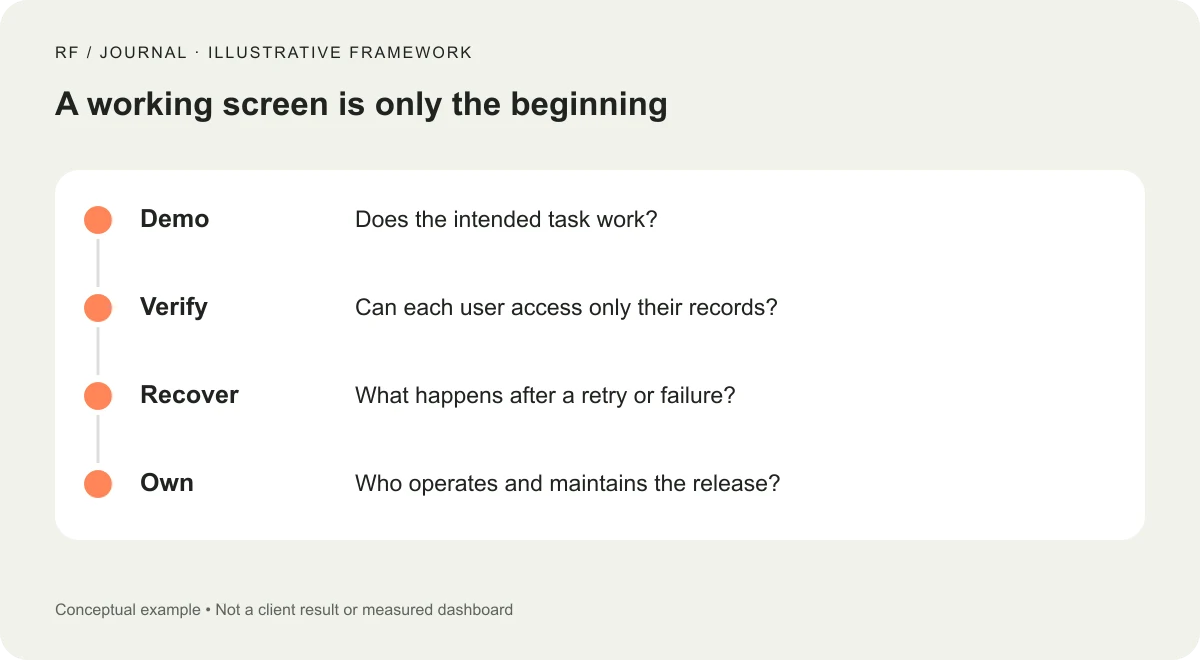
Illustrative release framework, not a security certification or client result.
Check states that the happy-path demo never reaches
For each step, ask what happens before, during and after the operation. Include empty states, loading, validation, success, failure and cancellation. Then add interruption: the person refreshes, closes the tab or returns after their session has expired.
In the appointment portal, an incomplete brief should explain which information is missing. A slow upload should show progress or a clear waiting state. A failed request should preserve safe user input where possible and explain whether anything was saved.
Repeated submission deserves special attention. Double-clicking or retrying after a network interruption should not silently create duplicate requests. Decide how the application recognizes the same intended operation and how the person can confirm its outcome.
Also check stale information. If staff change an appointment while a customer has an old screen open, the next action should not overwrite a newer decision without warning. These are workflow problems, not decorative details to finish after launch.
Keep important decisions on the trusted side of the application
Prices, permissions and eligibility for an action should not depend solely on values the browser sends. A user can interact with a service in ways the designed screen does not offer. The server and data layer need to enforce the relevant rules.
For this fictional portal, a customer may request a slot but cannot assign themselves staff approval. A status field submitted from the browser should not override that boundary. Similarly, an uploaded filename should not decide which private folder another customer can access.
Keep secrets out of publicly delivered frontend code. Configure integrations through the platform's appropriate server-side mechanisms and review what appears in errors and logs. A developer should verify the actual deployment, rather than assuming a generated environment handled every detail.
This is a focused launch checklist, not a complete penetration-testing method. Apps with sensitive information or critical operations need a review suited to that risk. The important planning decision is to budget for that work instead of treating it as an optional surprise.
Test notifications as part of the business process
A form can save successfully while its notification fails. Decide whether staff have a queue they can inspect independently of email. If email is the only record that a request arrived, a delivery problem can become a lost customer.
Test who receives each message and what it includes. Do not expose a private brief in a broad distribution list. Give messages enough context to identify the request without unnecessarily duplicating sensitive information.
Keep transactional confirmation distinct from marketing consent. Requesting an appointment should not silently enroll somebody in a promotional sequence. The wording and actual integration should agree with the business's intended practice and applicable requirements.
Use a test environment and controlled recipients for checks. Record expected messages, actual recipients and failures. The result should show that a real notification path worked, rather than that the interface displayed a reassuring sentence.
Review usability with the keyboard and a narrow screen
Generated layouts can look polished at the viewport used during creation. Inspect the actual tasks at narrow widths, including longer names, error messages and uploaded filenames. Check that controls remain usable without overlapping or hiding important text.
Use the keyboard to complete the primary journey. Can the person reach each control, identify focus and understand errors? When a dialog opens or closes, does focus move somewhere useful? Our keyboard accessibility review offers a task-based starting point.
Do not turn that quick review into an accessibility compliance claim. Record what was tested and what remains outside the scope. A responsible handoff is specific about evidence rather than broad about reassurance.
Ask someone unfamiliar with the prototype to interpret the confirmation. If they believe the appointment is guaranteed when staff still need to review it, change the language and state design. User understanding is part of correctness.
Plan recovery before replacing the previous process
Know which release is live, which data changes accompanied it and how the team will respond if a critical journey fails. Restoring application code may not reverse a database change. A recovery plan needs to account for both.
Agree on a fallback for new requests. That might be an existing contact channel with clear staff ownership while the issue is investigated. Avoid a fallback that simply sends the customer back into the broken workflow.
Our business-journey update checklist concerns WordPress maintenance, but the underlying acceptance principle transfers: verify the task that matters to the business after a release, not only the homepage.
Define the person who can pause a failing integration and the person who communicates with affected customers. These responsibilities should be documented before the first incident. A generated application cannot assign operational ownership by looking confident.
Hand over evidence, access and an operating owner
The client should receive the live URL, an account and permission map, integration ownership, configuration notes, known limitations and a short verification record. Include which parts remain experimental. Keep secrets in the appropriate secure system rather than in the handoff document.
Explain recurring costs and who receives service alerts. If the project depends on a builder account, a database service and an email provider, make those dependencies visible. A client should not discover the third subscription when a confirmation stops arriving.
Lovable's trust-center announcement illustrates growing interest in making security information visible. Treat such information as one input to a review, alongside the actual application, its configuration and its operating process. A public page does not replace the owner's understanding of the product.
Decide what earns a launch
For the fictional portal, release readiness means a customer can complete the request, see an accurate outcome, access only their own information and recover from ordinary errors. Staff can find and process the request. The owner knows what is live and what to do if it fails.
Those are testable conditions. “The AI built it” is a description of the creation process, not a substitute for them. Keep the speed of exploration, but give the release a clear boundary and a record of the checks it passed.
The best next step is to take one real journey through the candidate release using controlled accounts and realistic content. Write down the gaps before adding another feature. A convincing demo has already helped you imagine the product. The launch review helps you operate it.


