
Passkeys can make returning to a website feel simpler. The customer chooses an account and uses a device's normal unlock method instead of trying to remember another password. The product challenge is making that experience understandable without abandoning the person who changes devices, cancels a prompt or cannot access their usual credential.
Plan passkeys as an account lifecycle: enrollment, returning sign-in, credential management and verified recovery. Add them through the identity system that actually controls the account, and test the transition alongside existing users. A new sign-in button alone does not establish a complete authentication system.
This guide is a product and implementation planning framework for a fictional customer portal. It is not a security certification, cryptographic implementation tutorial or measured client result. Official documentation was checked on 19 October 2026; browser, provider and platform behavior should be verified for the intended setup.
Explain the capability without promising an invulnerable account
Google's passkey overview describes credentials tied to an account and a website or application, using public-key cryptography. A supported device can ask the person to verify through its screen lock. Biometric material is not sent to the website as part of that verification.
The protection is valuable, but it does not make every part of the account immune to attack. Sessions, recovery, support procedures and application permissions still matter. Avoid marketing language that turns a stronger sign-in mechanism into a promise that the whole service cannot be compromised.
Use an explanation the customer can act on. Tell them what they are creating, what will happen when they return and where to manage access. Avoid assuming they know which credential provider or device is involved.
The interface should help the person complete a task rather than require them to pass a vocabulary test about authentication. A concise explanation with a working alternative is often more useful than an introductory lecture displayed during checkout.
Identify which system owns the account
Before designing the screen, identify the existing identity provider, account database and session mechanism. A hosted ecommerce account, a membership plugin and a custom portal may have very different supported integration paths.
Confirm whether the platform already offers passkeys and how that feature relates to the current sign-in route. Do not add a second unrelated account store simply because a standalone demo is easy to build. Customers should not acquire duplicate identities while trying to access the same service.
Review the supported implementation with a developer or identity specialist. The server must verify the authentication result and connect it to the correct account. An attractive browser prompt is not evidence that those checks are correct.
Record domain and environment assumptions. Test and production accounts should be distinguishable, and a planned domain change deserves review before rollout. Use the platform's current documentation rather than copying a configuration that happened to work in another project.
Enroll an existing customer without creating another identity
For a fictional client portal, start with customers who can already access their accounts through the supported route. Offer passkey enrollment after an appropriate authenticated step, with a clear explanation and an option to defer.
Confirm which account receives the new credential. If a person uses different email addresses for billing and contact, the product must not guess which one controls access. Resolve the account relationship through the existing verified system.
Show an accurate result after enrollment. Tell the customer the credential was added and where they can manage it. Avoid displaying a successful state merely because they opened the browser dialog.
Test cancellation and failure as normal outcomes. The person should be able to return to their task without losing a form or being trapped in repeated prompts. Declining enrollment today should not be treated as an error in the business relationship.
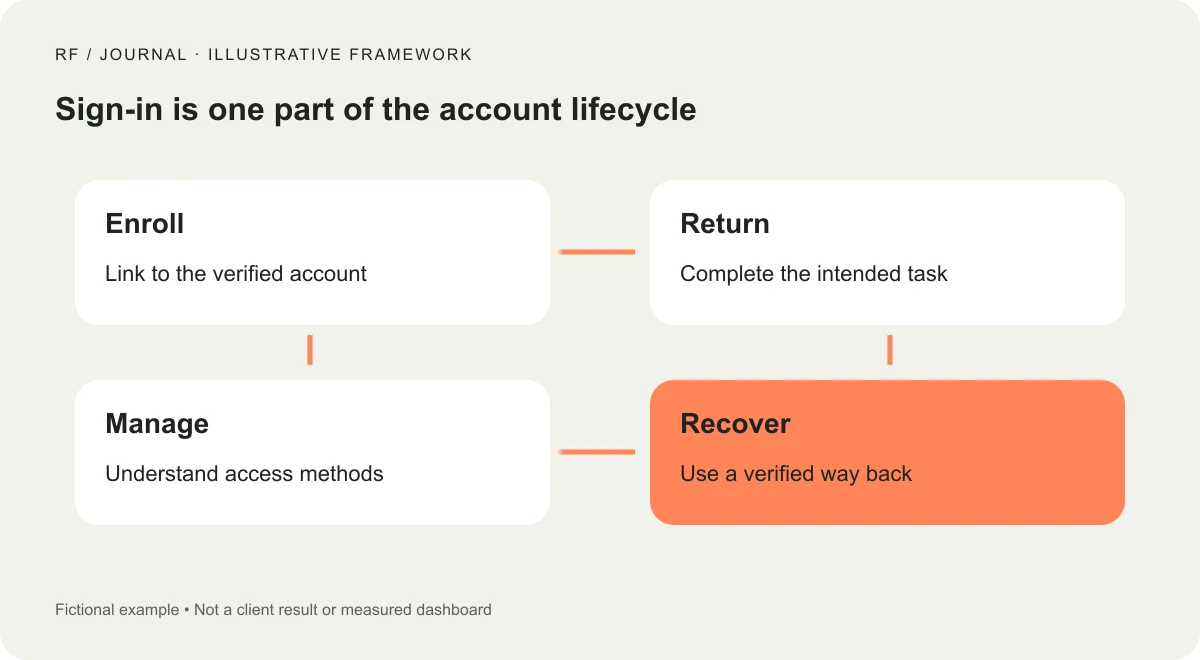
Conceptual account-flow illustration, not a live authentication interface or security assessment.
Keep returning sign-in understandable
The web.dev form-autofill guide explains using WebAuthn conditional UI to support passkeys alongside existing password users. Its approach illustrates an important product principle: people should not have to remember which sign-in technology they previously chose before they can reach their account.
Use the capabilities supported by the intended identity platform and browser combination. Test the actual experience rather than reproducing a screenshot of a different operating system's prompt. The browser and credential provider may control part of the interface.
Handle a canceled or unavailable prompt without a dead end. Explain how to use another supported method or obtain help. Do not repeatedly reopen the same interaction without the person's intent.
Once sign-in succeeds, return the customer to the task they were doing. A person trying to view an invoice should not have to rediscover it from the homepage because the authentication design forgot the destination.
Test several realistic access situations
Use a controlled matrix representing the audience. Include a returning customer on their usual device, someone without a passkey for the account and a person who cannot access their normal credential provider.
Also test more than one account where the platform permits it. An account selector should make it possible to understand which identity is being used. A successful sign-in to the wrong customer account is not the outcome the user intended.
Browser and device support evolves. Maintain an explicit compatibility scope and a supported fallback rather than claiming universal behavior. The aim is to know what your users encounter in the combinations you intend to support.
Do not conduct these tests against other people's accounts or collect their credentials. Use authorized test identities, appropriate environments and the platform's supported testing tools. Record the conditions so a later change can be checked against the same scenarios.
Design credential management as part of the product
Customers need a clear place to inspect the access methods associated with their account. The exact information available depends on the identity system. Use meaningful labels and accurate status rather than inventing device details the application cannot verify.
Decide how a credential can be removed and what happens if it was the last usable route. A management action should not accidentally leave the person unable to return. Reauthentication requirements and warnings need review within the supported identity design.
Avoid suggesting that removing one credential necessarily signs out every existing session or removes it from every provider. Those are separate behaviors that must be confirmed. Explain the actual effect of each action.
Give support staff an operating guide. They should know where to direct customers and which information they must never request. A customer should not be asked to send a device PIN or private credential material to prove ownership.
Plan recovery without building a weaker shortcut
Recovery is not a decorative forgot-password link added after the rest of the system is complete. It determines how a person regains access when their usual method is unavailable. Review it with the identity provider and the people responsible for account security.
Document the supported routes and the evidence required. Depending on the platform, a person may have another enrolled credential, an existing verified method or a provider-managed recovery process. Do not promise a route until it is available and tested in the intended setup.
Support staff should not bypass the process because a message sounds convincing or urgent. Establish escalation and verification procedures appropriate to the service. This article does not prescribe a universal recovery policy; that decision depends on the account's sensitivity and operating requirements.
Test the customer's understanding. Can they find the help route and explain what they should do next? An excellent technical recovery mechanism still fails as a product if people cannot discover it when they need it.
Review the full flow for accessibility
Test the website-controlled parts with the keyboard and relevant assistive technology. Check labels, instructions, errors, focus and the return from browser-controlled prompts. Do not assume the device dialog fixes problems in the page around it.
Keep status messages specific. Say whether a credential was added, sign-in was canceled or another method is needed. Avoid an unexplained authentication failed message that leaves the person guessing whether they used the wrong account or encountered a temporary problem.
Our keyboard accessibility guide offers a task-based review approach. Apply it to enrollment and management as well as the main sign-in page. A quick keyboard check is not a complete accessibility audit.
Review the mobile transition too. A user may move between an email, a browser and a device prompt. Confirm that returning to the website preserves the intended task and displays a clear result.
Measure adoption and completed access separately
An enrollment prompt shown is not a credential created. A credential created is not a successful returning sign-in. Define these observations separately, and collect only the information needed under the site's measurement and privacy approach.
Inspect cancellations, failures and fallback use without assuming every alternative-method choice is a problem. A person might deliberately use another supported route. The goal is successful authorized access, not maximum use of one interface control.
Include support outcomes in the review. Are customers asking how to change devices, identify their account or recover access? Those questions may reveal unclear explanations rather than a failure of the underlying standard.
Do not claim improved conversion or fewer support requests until you have suitable evidence. A rollout can be technically complete while the business effect remains uncertain. Keep that distinction in client reporting.
Launch as a supported account change
Begin with an appropriate pilot group and a clear support route. Confirm enrollment, returning access, cancellation, management and recovery before expanding. Record the identity configuration and the version being reviewed.
Our client-project launch checklist explains why a working screen needs verification of the underlying business journey. Authentication deserves the same treatment, with review appropriate to the account's risks.
Keep the existing supported route until the responsible team has approved the transition plan. Do not remove a fallback just to make the launch announcement sound more decisive. The migration should follow evidence about access and recovery.
Plan the next review when the identity provider, domains or application account model changes. Passkeys can simplify a frequent interaction, but the dependable product is the entire way into and back into the account. Start there, and the sign-in button becomes the visible part of a process the team can actually support.


