
A website enquiry reaches an automation, several nodes turn green and the team assumes the lead is in the CRM. Sometimes it is. Sometimes the workflow saved an empty field, selected the wrong company or sent the notification to an inbox nobody monitors. Technical completion and business completion are related, but they are not identical.
For a dependable n8n website automation, define the expected record, validate the input, protect against duplicates and verify the result in the destination. Add an error route and a person who owns exceptions before connecting live enquiries. The canvas should explain what happens when a step fails, not only what happens when everything cooperates.
This article proposes a fictional website-to-CRM workflow. It does not report a deployed client system or measured time saving. Official n8n documentation was checked on 19 October 2026; review the actual installed version and configuration before implementation.
Write down what the customer submission must become
Start with an outcome a staff member can recognize. An accepted enquiry should have one internal reference, the required contact details, the customer's message and a visible status in the destination system. It should be assigned to the intended team.
Decide which fields are mandatory and which may remain unknown. A missing company name should not become a fictional company because the CRM happens to prefer a populated field. Preserve the difference between information the customer provided and information staff still need.
Then define the notification separately. Saving the record is one operation; telling the reviewer about it is another. The team should be able to find the enquiry even if email delivery fails.
This exercise may reveal that the proposed automation is doing too much. If the first version also enriches contacts, scores leads and drafts replies, separate those steps. A small, verifiable intake workflow is a better foundation than a broad flow with unclear results.
Map the real input before mapping nodes
Collect approved sample submissions covering normal and awkward cases. Include optional fields, long messages, unusual characters and an incomplete submission. Use fictional data or appropriately minimized examples rather than copying private customer information into a test service.
Agree on a field map. The website's contact email, the CRM's primary email and a notification recipient are different concepts. A convenient field name should not substitute for understanding what the data means.
Validate structure and expected values before writing to the destination. If a required identifier is missing, create a visible exception rather than quietly routing the item to the first matching record. If a message cannot be processed, retain enough safe context for staff to recover it.
Treat the submitted message as untrusted content. It is material to store or review, not permission to change workflow settings, execute arbitrary instructions or reveal other records. The integration's access controls should enforce what the task is allowed to do.
Know which webhook the live form uses
The n8n Webhook documentation distinguishes test and production URLs. It also describes authentication and response options. Confirm the actual production route and its intended caller rather than leaving the form attached to a temporary test setup.
Where possible, keep private integration credentials in the appropriate server-side or managed credential system. A secret included in public browser code is not protected simply because the form looks normal. The right architecture depends on the form and hosting setup.
Decide what the website's response means. An immediate acknowledgment may mean that processing started, not that the CRM record and notification both completed. Use confirmation wording that matches the behavior.
For longer processing, consider a durable receipt and an internal status rather than holding the visitor in an indefinite loading state. The person should know whether the enquiry was received and what to do if they do not get the expected follow-up.
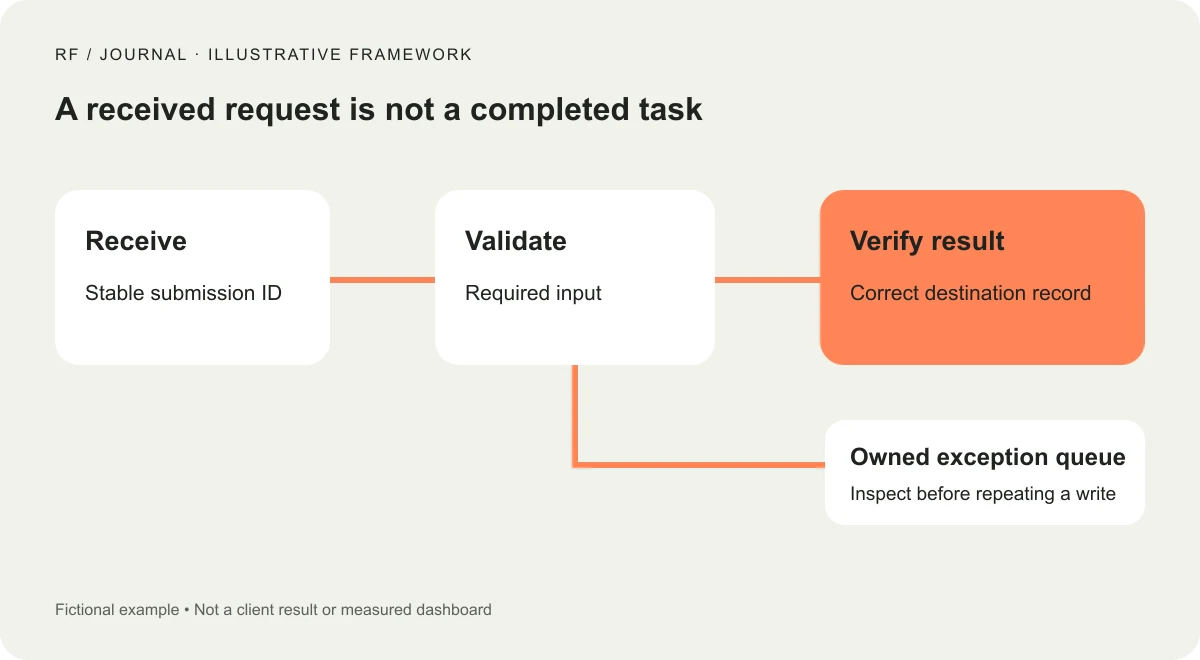
Proposed workflow, not an exported n8n canvas or a measured client implementation.
Give each submission a stable reference
Network interruptions make retries normal. A browser may repeat a request, a sending service may retry after a timeout, or an operator may rerun an execution. The business requirement is that the same intended submission should not silently create several leads.
Define how the workflow identifies an already accepted item. Use a stable submission reference and appropriate checks in the destination or an integration ledger. Do not rely solely on the customer's name; two different people can have the same name, and one customer can submit a legitimate new enquiry.
Record each completed step against that reference. If the CRM write succeeded but the notification failed, retry the notification without recreating the lead. A broad rerun is easy to click and harder to reconcile.
Also define an intentional resubmission. If a customer changes their brief and submits again, decide whether that creates a new enquiry or updates an existing one. That is a business decision that should be visible in the workflow design.
Separate an execution error from a wrong business result
An execution error can stop a node. A wrong result can pass through the whole workflow without an exception. Both need attention, but they need different detection.
Examples of execution failures include a rejected request, an expired credential or an unavailable destination. Examples of business failures include a record saved without the message, an incorrect assignment or a notification that references the wrong enquiry.
After a write, inspect the destination's response and verify the fields needed to establish success. Where appropriate, retrieve the resulting record and compare the expected identifiers. Do not treat a generic success response as evidence for every field in the business brief.
Keep the check proportionate. The aim is to confirm the result that matters, not to duplicate every system feature inside the automation. Choose a small number of meaningful assertions and make failures understandable to the owner.
Add an error workflow and test the alert itself
n8n's error-handling guidance explains assigning an error workflow in the workflow settings, beginning with an Error Trigger. It also describes using Stop And Error when your own conditions should fail an execution. Use the current documentation for the installed version.
Include enough context in an alert to identify the workflow, submission reference, failed stage and safe next action. Avoid copying unnecessary customer content or credentials into email, chat or a broadly accessible log.
Test an actual controlled failure. Confirm that the designated person receives the alert and can locate the relevant execution. A beautifully configured notification that depends on the same broken credential as the main workflow is not a dependable recovery route.
Do not assume error alerts detect a workflow that never starts. For important intake processes, define how the team will notice a missing expected run or a gap between form submissions and recorded enquiries. The appropriate monitoring method depends on the volume and systems involved.
Design retries around the failed step
Not every failure deserves the same retry. A temporary service interruption may recover. A missing required field will not become valid because the workflow asks three more times. Classify the failure before choosing the response.
For a temporary failure, use bounded retries and a clear final exception. For invalid input, route the item for correction or reject it appropriately. For an uncertain outcome after a write, inspect the destination before repeating the operation.
Record why an operator reran an item and which stages were repeated. That history helps explain duplicates and supports a better fix. A workflow that needs frequent manual reruns is revealing an operating problem, even when each rerun eventually succeeds.
Keep a manual fallback. Staff should have an agreed method to recover an enquiry while the integration is unavailable. Avoid asking them to improvise direct database edits or share credentials through messages.
Build a short acceptance matrix
Use a test set that reflects the intended workflow rather than only the vendor's example payload. The expected result should be clear before the execution runs.
| Scenario | Expected evidence |
|---|---|
| Complete enquiry | One correct record and a traceable notification |
| Missing required field | Clear rejection or a visible exception |
| Duplicate delivery | No unintended second lead |
| CRM unavailable | Bounded retry and an owned recovery item |
| Notification fails | Lead remains available; only notification needs recovery |
| Wrong field mapping | Outcome verification identifies the mismatch |
Check the website confirmation too. Our contact-form guide concerns the visitor-facing interaction, while this workflow handles the downstream result. Those parts should agree about what received and completed mean.
Add AI only where judgment is useful
A conventional workflow can validate fields, route records and send an agreed notification without a language model. Keep those deterministic steps explicit. Adding AI to every node makes neither the field mapping nor the commercial process clearer.
If the team later wants a proposed enquiry summary, keep it separate from the original message and label it as generated. Do not let the summary overwrite the evidence the reviewer needs. Uncertain details should remain uncertain.
Our AI-agent boundary guide explains how to limit an assistant's authority. For this intake workflow, the key distinction is between preparing an internal suggestion and taking an outbound business action.
Evaluate the additional review work before expanding. A generated paragraph is not automatically useful just because it appears without typing. Keep the part that helps the team and remove the part that creates more correction than value.
Hand over an operating process, not only a canvas
Document the workflow's purpose, production endpoint, permitted data, connected services and owners. Keep secrets in the credential system and describe how authorized staff obtain access without including the secret values in the handover.
Include a small recovery runbook: where to inspect status, how to identify a duplicate, when a retry is appropriate and who can change the integration. Record the checks that demonstrate the current version works.
Agree on a review trigger when forms, CRM fields or connected services change. A workflow can continue running while the meaning of its inputs has drifted. Revalidate the business outcome after those changes.
Start with one submission and follow it into the destination. Then deliberately break a controlled step and recover it. When both paths are understandable, the automation is ready for a useful pilot rather than simply a convincing screenshot of green nodes.


