
A website discovery project can arrive as a folder rather than a tidy brief: service documents, product sheets, old page exports, research notes and several conflicting versions of the same explanation. Organizing that material is a real task, even before anyone starts designing a page.
Kimi is worth evaluating for this kind of research-heavy work because its current product guidance describes document-oriented and agent workflows. The useful question is whether it can help a team turn a large input into a smaller set of traceable decisions. A long answer that loses the origin of its claims is not a successful research deliverable.
The process in this article is proposed for CMS and ecommerce projects. No client deployment, speed improvement or product benchmark is claimed. Official guidance was checked on 14 October 2026; capabilities and access must be verified in the intended account.
What the current Kimi guidance says
Kimi’s model and mode guide lists K2.6, K3 and K3 Cluster. It distinguishes faster question-and-answer use from document and agent work, and describes editable document outputs with K3. It also makes clear that model choice and reasoning effort affect credit use.
The Agent Swarm guidance describes large-scale parallel research and batch processing, currently powered by K3. Treat vendor capacity and speed statements as product claims, not evidence of what a particular client project will achieve.
This means older explanations centered only on K2.6 are incomplete as a description of the current product. It does not mean every project needs a cluster. A clear brief and a modest amount of source material may be better served by a simpler workflow.
Start with the decision the research must support
Before uploading material, decide what the team needs to learn. Are you choosing a content model, checking conflicting product claims or planning a migration? These questions require different outputs.
Consider an illustrative manufacturer preparing a new website. Its documents disagree about which accessories fit which product families. The research goal is not to summarize every document. It is to produce a compatibility decision record with sources and unresolved conflicts.
A useful brief names the relevant documents, specifies the fields to extract and says what to do when sources disagree. It should forbid inventing missing values. The assistant’s job is to organize evidence so the responsible product owner can resolve the uncertainty.
If the business cannot state the decision yet, begin with a small discovery pass. Ask for the main questions and contradictions, not a finished site architecture presented as though all facts were settled.
Inventory the source material
Create an input list with document name, version, date, owner and intended authority. Include whether the file is approved for use in the chosen AI environment. Remove material that the task does not need.
A recent sales presentation may be useful context but still lack authority for a technical specification. An older approved manual may be authoritative for one product version and wrong for another. Make those distinctions visible before asking the assistant to reconcile content.
Separate public information from internal material and personal data. A large context allowance is not a reason to upload an entire customer database. Review the actual account’s terms, access controls and retention arrangements with the responsible owner.
Where documents lack dates or clear ownership, mark that uncertainty. A model can recognize patterns in a file, but it cannot establish an approval history that the business never recorded.
Extract facts into an evidence ledger
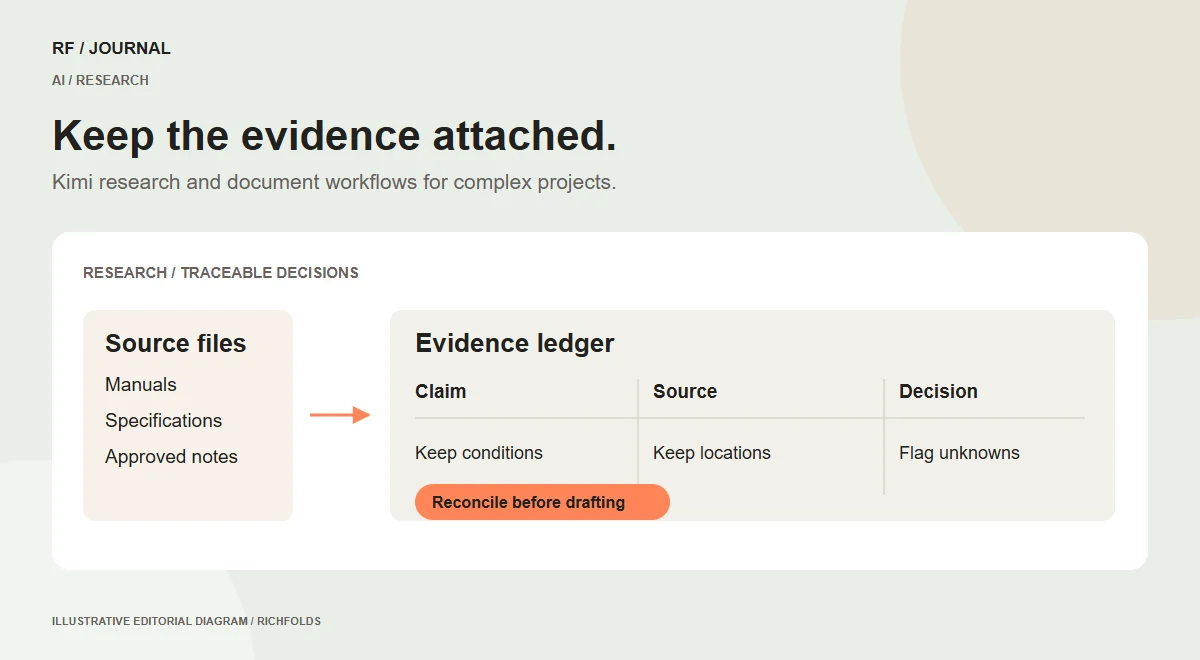
Ask for a structured record rather than a seamless narrative. Each row should contain the claim, the source location, relevant product or service scope and any qualification that changes its meaning.
For the manufacturer example, a compatibility row might identify the product family, accessory identifier, supported configuration and source page. If the source says compatibility requires an adapter, that condition belongs in the same record. Removing it to shorten the summary would make the result misleading.
Review a sample of rows against the original files before processing the whole collection. This exposes misunderstandings in field definitions early. A column labelled Model could refer to a product model, an AI model or a business model depending on the material.
Keep original wording available where ambiguity matters, but avoid copying long passages into public content without a valid reason. The ledger is a working research record, not permission to republish another organization’s documentation.
Divide work only when the pieces are independent
Parallel agents can be useful when tasks have a shared extraction format and independent sources. For example, separate groups of approved product manuals could be reviewed against the same field definitions.
They are less helpful when the task depends on a sequence of decisions. A content model should not be finalized in one branch while another branch is still discovering whether the product structure is correct. Faster simultaneous output can create more reconciliation work if the dependencies are ignored.
Write the common rules before splitting the task. Specify terminology, source priority, output format and the treatment of unknowns. Give each work unit a clear boundary and retain the source identifiers in its output.
Use the cluster only when the expected benefit justifies the complexity and credit use. The right comparison is the accepted result after reconciliation, not simply the time until several agents return answers.
Reconcile findings before drafting pages
Bring the extracted records together and look for contradictions, duplicate claims and inconsistent naming. Assign unresolved issues to the appropriate business owner. Do not let a polished final summary hide the disagreement.
For a proposed CMS project, the reconciliation might reveal that two service names describe the same offer or that one page promises delivery coverage the operations team does not support. These are decisions to resolve before design, not merely editorial inconsistencies to smooth over.
Keep a distinction between a confirmed fact, a proposed interpretation and an unresolved question. The assistant can suggest an interpretation, but the record should show who accepted it and what evidence supported the choice.
Once the facts are stable, use them to draft a page outline or content model. That order prevents the team from investing in a beautiful structure built around unsupported information.
Make editable documents useful to the recipient
Kimi’s ability to produce editable files is relevant when the client needs a deliverable they can maintain. The extension alone does not establish that the document is well organized or that its calculations are correct.
For a proposed discovery workbook, include fields the owner can update: decision, source, responsible person and next action. Keep explanatory notes close to the rows they qualify. Avoid embedding important logic in an image that cannot be inspected or edited.
Check formulas and totals independently when the output contains a spreadsheet. Confirm that slides preserve meaningful source attribution rather than compressing a qualified statement into an absolute claim. Review Word or PDF output for headings, page breaks and readable tables.
Ask the recipient to perform a realistic update. If they cannot tell which cell to change or where a conclusion came from, the output needs another pass even if it looks professional.
Treat long context as capacity, not comprehension proof
Being able to submit a large amount of text does not establish that every relevant detail was used correctly. Important qualifications can be overlooked, and contradictory passages can be combined into an answer that sounds more certain than the evidence.
Use targeted checks for high-value claims. Ask where a conclusion came from, then inspect that location. Test a known ambiguity from the input to see whether the workflow preserves it or replaces it with a convenient answer.
Do not use a context-window number as a proxy for quality. A smaller, well-curated source set with clear authority can produce a more useful research result than a large collection of duplicate and outdated material.
When the task is too broad, split it by question rather than only by file size. A separate review of delivery policy, product specifications and editorial tone can preserve meaning better than arbitrary chunks of a mixed folder.
Use research to improve the customer journey
The evidence ledger should eventually support a visitor’s decision. For a store, that might mean clearer compatibility, consistent filter values or an accurate explanation of included items. For a service site, it might mean a sharper account of scope and eligibility.
Choose a representative journey and identify the information the visitor needs at each step. Then check whether the proposed content supplies it. This connects research with interface decisions instead of letting the project end as a folder of summaries.
For the illustrative manufacturer, a useful result might be a filter based on verified product family and a page section explaining adapter requirements. That proposal still needs implementation and usability checks. It is not proof that sales will increase.
Our product discovery guide explains how catalog information affects finding and choosing products. Research assistance should improve that information foundation before it adds more page content.
Evaluate accuracy and operating cost together
Prepare several realistic research tasks and define the required output. Include one clean source set, one with contradictions and one where the answer is not present. The last case matters because an honest unknown is often the correct result.
Measure the work required to reach an accepted ledger: preparation, processing, checking and corrections. Record credit use and the chosen model configuration where the product exposes them. A quick first draft can be expensive if reviewers must reconstruct every source.
Decide which failures are acceptable for the use case. An internal brainstorming note has different consequences from a compatibility record used to guide purchases. Apply more demanding checks where an incorrect answer can lead to the wrong product or an operational commitment.
Keep the accepted examples as a regression set. Revisit them when the model, source format or workflow changes, rather than assuming the original evaluation covers every future release.
What is upcoming, and what remains unconfirmed
The current official help pages establish K3-oriented capabilities; they do not provide a reliable public schedule for every future model or feature. We therefore do not present a hypothetical next Kimi release as confirmed news.
For planning, monitor official product guidance for changes to model availability, document formats, tool access and credit behavior. Those changes can affect an existing process even when they do not arrive with a dramatic new model name.
The practical next step is a contained research pilot. Choose approved documents, define the decision, build a traceable output and have the subject owner verify it. Expand only when the evidence and maintenance process support the larger task.
For the broader platform decision, choose a CMS around your team’s work. Kimi can assist the research that informs that choice, but it cannot replace the organization’s ownership of the facts.
Research checked on 14 October 2026. Product availability may vary by account, plan and configuration. Examples are proposed workflows, not measured client results.


