
The editor changes a headline. The preview shows the old headline. Somebody presses refresh three times, someone else blames the CMS and the launch meeting becomes a discussion about caches.
A useful headless preview needs a clearer contract. It must identify which content version is being shown, who may see it, how fresh it is and how the editor leaves preview mode. Draft visibility and public publishing should remain separate.
This guide proposes an acceptance plan using Sanity's documentation as a concrete example. It is not a universal implementation for every CMS or framework. Sources were checked on 22 October 2026, and no live client preview or security test is claimed.
Define what the editor is previewing
A preview can mean several things: the latest draft, a scheduled content release, a different locale or a page assembled from both changed and unchanged documents. Write down the intended version before choosing the technical mechanism.
Sanity's presenting and previewing content guidance describes perspectives for selecting published, draft or release content. The important project decision is which perspective the frontend should use for a given editor session.
Do not let “preview” mean whatever happened to be returned by a query. The editor needs a visible indication of the state being reviewed. A label such as “Draft preview” is useful only when the implementation actually serves the intended draft.
Also decide whether linked pages remain in the same preview context. If the editor follows a related article and silently returns to public content, the difference should be understandable rather than mistaken for a lost edit.
Map the boundaries before wiring the page
Create a small architecture note with the CMS, Studio or editing interface, frontend, preview activation route and caching layer. Identify where draft-reading authority exists.
The public page should use the intended public content configuration. The authorized preview path can use a different configuration to retrieve drafts. A convenient query parameter alone should not be treated as permission to retrieve private content.
Sanity's draft-mode implementation guide describes validated preview activation, server-side token handling and preview-aware content fetching. It explicitly keeps the draft-read token out of browser bundles and disables the content CDN for the relevant draft perspectives. Follow the current framework integration guidance rather than copying a token into client JavaScript.
That vendor mechanism is part of the implementation, not a complete security review of your application. Hosting access, session behavior, shared links and every downstream cache still need appropriate checks.
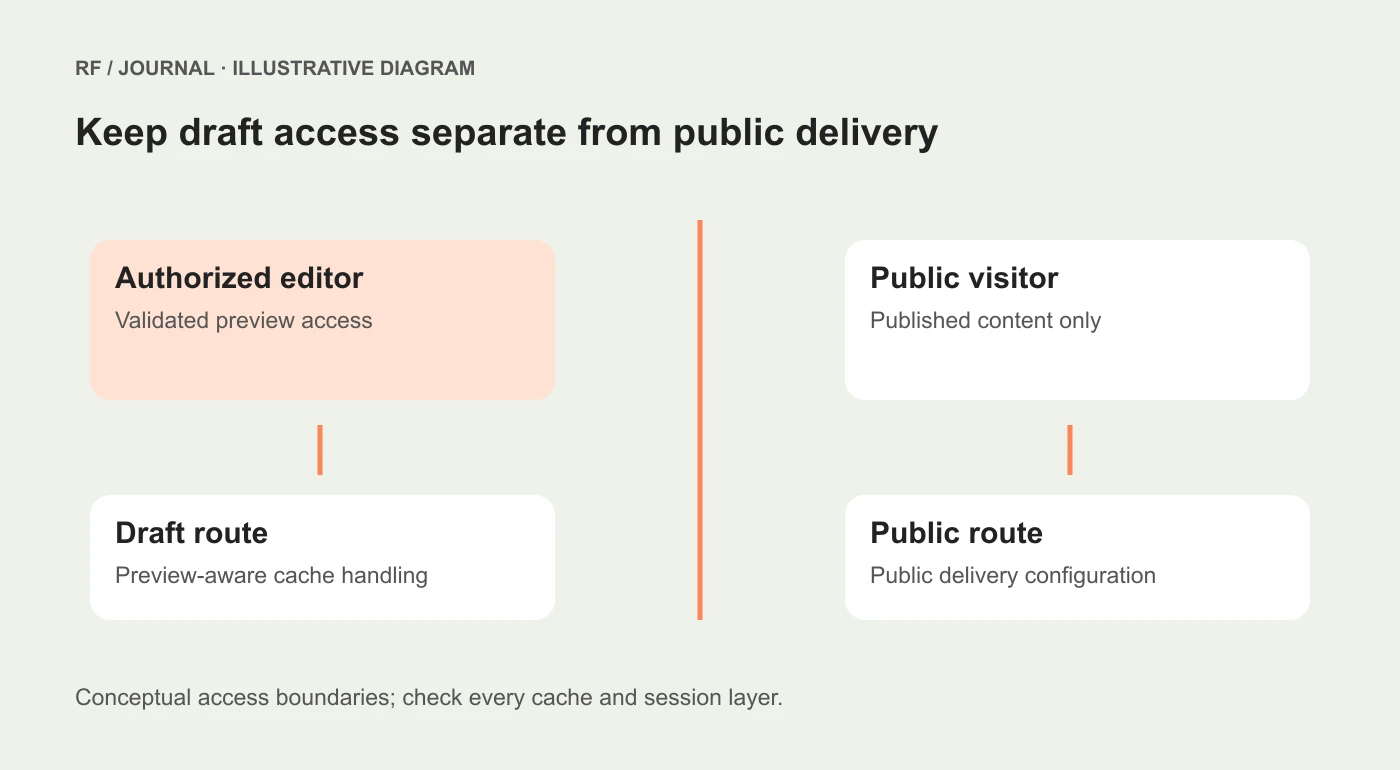
Conceptual access and cache boundaries, not a diagram of a deployed client system.
Keep preview responses out of public caches
Disabling one upstream cache does not automatically configure every other cache in the delivery chain. The frontend framework, hosting layer and any intermediary can have their own behavior.
Ask the developer to document how preview responses are distinguished and handled. Then test a fresh public session after viewing a draft in an authorized session. The public session should receive the intended published content, not a response warmed by the preview visit.
Also test the reverse. An authorized editor should not repeatedly receive a stale public response and conclude that their changes were lost.
Use harmless, unmistakable test content to distinguish versions. A synthetic headline can make a cache mix-up easier to recognize without putting confidential launch information at risk.
Record which layers were checked. “We disabled caching” is too broad when it refers to only one client option in a multi-layer system.
Make entry and exit understandable
The editor should have an obvious route into the correct page preview and a reliable way to leave it. Include a clear state indicator and a public-view option where appropriate.
Test the link from the actual editing workflow. A developer manually opening a prepared URL does not establish that an editor selecting a document reaches the right route, locale or content version.
When preview access expires or cannot be validated, show a useful recovery path. Avoid an unexplained blank page. The interface can explain that access needs refreshing without exposing secrets or internal debugging details.
After leaving preview mode, inspect subsequent navigation. The editor should understand that they are now looking at the public version. A stale banner saying “Draft” while public content is displayed creates a different kind of confusion.
Treat shareable previews as a separate feature
An editor's authenticated preview and a link intended for an external reviewer are different access decisions. Do not assume the latter is authorized merely because the former works.
Before enabling sharing, define the audience, content scope, expiry or revocation method and any restrictions on forwarding. Confirm that the business is comfortable with the resulting access model.
Avoid placing private tokens in URLs, screenshots or support messages. A preview link can itself be sensitive if possession grants access. Use the CMS's supported mechanism and review the complete route.
Also distinguish indexing controls from access control. A noindex instruction can guide compliant crawlers, but it is not a password and does not prevent a person with access from reading or sharing the page.
Test the editorial journey as a sequence
| Scenario | Proposed expected result | Evidence to retain |
|---|---|---|
| Authorized draft visit | Intended draft content and clear state | Route and content version, without secrets |
| Fresh public visit | Published content only | Separate-session response |
| Draft edit | Preview reflects the change through the intended update flow | Edit and observed result |
| Preview exit | Subsequent view uses public state | Navigation and state indicator |
| Invalid or expired activation | No unintended draft disclosure | Safe error and recovery route |
| Actual publication | Public page changes through the release process | Published record and public check |
Add locale and scheduled-release cases only when the project uses them. Include a linked page and a page assembled from several documents if those relationships matter to the editor.
This is an acceptance plan, not a completed audit. For a real project, record the environment, version, reviewer and outcome rather than marking every row passed by default.
Keep previews honest about production behavior
A draft preview can show layout and content accurately while still differing from production delivery. Analytics, forms, payments, search indexing and external integrations may be intentionally disabled or configured differently.
Tell reviewers which actions are safe and which are illustrative. A working-looking enquiry form in a preview should not quietly send a real message unless that behavior is intended and authorized.
Our headless commerce decision guide helps evaluate the broader operational tradeoffs. If the project is a migration, use the CMS migration plan to keep content and release responsibilities aligned.
Start with one route and two clearly different versions
Build a representative page with a published version and an obviously different draft. Verify authorized entry, freshness, public isolation and exit. Then expand the same checks to linked documents and release scenarios.
The result should let an editor answer a simple question confidently: “Is this the version I meant to review?” When the access and cache boundaries are explicit, the preview becomes a useful publishing tool rather than a refresh-button ritual.
AI-assisted editorial guidance. Original illustrations are conceptual, not client evidence. Platform documentation checked 22 October 2026.


