
The first draft of an AI-built website can arrive before the team has agreed on the menu. That is a useful change. It gives people something visible to discuss instead of asking them to imagine a page from a document.
The harder question appears after launch: can the person running the business update the site accurately without breaking its structure? Evaluate an AI website builder through ordinary editing and operating tasks, not only the design it generates from the first prompt.
This guide proposes a practical evaluation for a fictional pottery studio. It is not a product ranking or a claim that RichFolds tested every builder. Official Wix documentation was checked on 18 October 2026 to ground the capability discussion; the evaluation framework is our editorial recommendation.
Separate the generator from the system you will operate
An AI generator helps create a starting point. The ongoing website also needs content management, permissions, integrations, domains, hosting and an owner. Some platforms combine these functions. Others require a collection of services and custom work.
Wix's AI website builder describes conversational creation alongside manual editing and business tools. Its site-creation documentation explains an AI-assisted route into a website. These are examples of available capabilities, not evidence that any generated site automatically meets your business requirements.
Do not infer a feature from a screenshot. Confirm whether it is included in the plan you would buy, available in the relevant editor and suitable for the workflow. A booking interface pictured on a product page does not answer how your cancellation rules will work.
The evaluation should end with a system the team understands. If nobody can identify where a class description is stored or who receives a booking request, a polished page is still hiding an unfinished operating model.
Write a brief that contains facts the builder cannot know
For the fictional pottery studio, prepare approved opening hours, class types, location, contact details, booking rules and a small set of owned photographs. Record which claims are supported and which details are still undecided.
Do not ask the generator to invent testimonials, instructor qualifications or a business history. Those details can look plausible enough to survive several reviews. Give the project a fact sheet and remove unsupported statements before they become published copy.
Describe the visitor's task. A new student needs to understand the class, find the location, check suitability and request a place. That is more useful than asking for a modern, premium, engaging website and hoping those adjectives contain a booking process.
Also explain the editor's task. The studio manager updates class dates and availability. A teacher may update a biography. The owner controls pricing and policies. These responsibilities should influence the content structure and permissions from the beginning.
Run an everyday editing test
Use the same small assignment for every candidate platform. Ask the future site editor to change opening hours, add a class, replace an image, correct a heading and preview the result on a phone. Give them realistic content rather than a two-word placeholder.
Observe where the editor needs help. A clear workflow might expose a structured hours field. A less suitable setup might require finding the same sentence in several pages and manually editing each copy. Both can produce the same launch-day appearance while creating different maintenance work.
Check whether editing one item updates related displays. A class date may appear on the listing, detail page and homepage. If each appearance is independent, record the extra work and the risk of disagreement. AI generation does not automatically create a useful content model.
Keep the test practical. You are evaluating whether this team can maintain this website, not awarding points for the largest settings menu. A simpler system can be a better fit when it supports the required changes with fewer opportunities for mistakes.
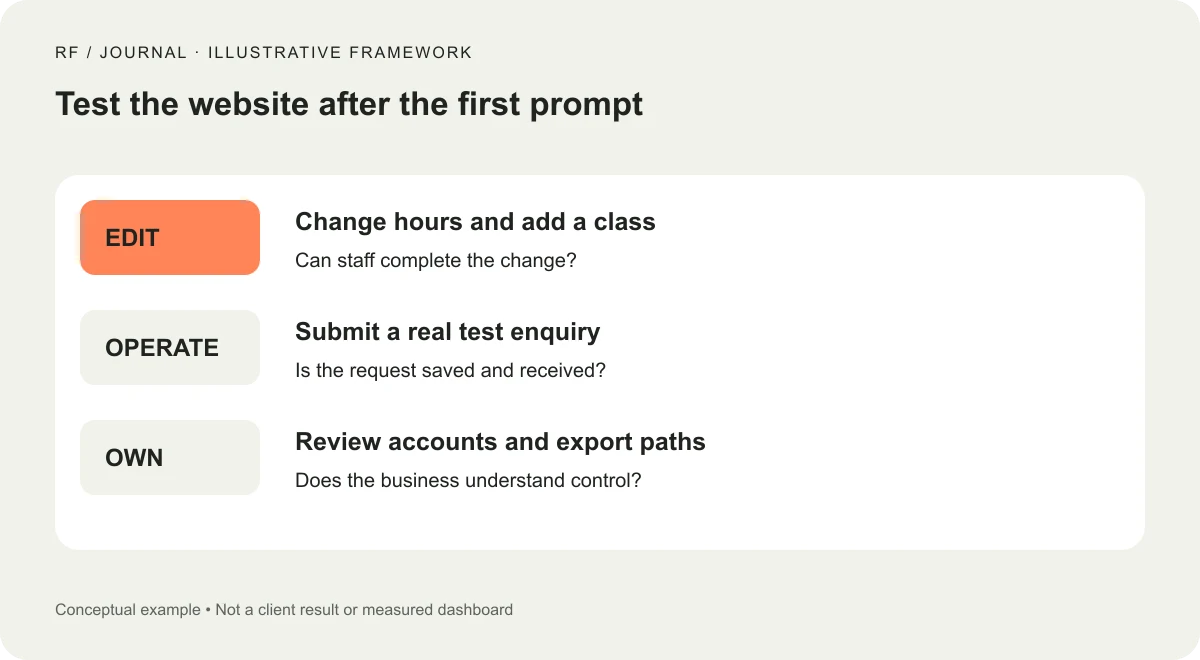
Conceptual evaluation framework. The studio and interface are fictional.
Make a change, then check what else moved
Replace the short class title with a longer, realistic one. Add an extra sentence to the description. Use a photograph with a different composition. Inspect the resulting cards, navigation and mobile page.
The question is whether the design has sensible content limits. A layout that depends on every title having exactly the same length needs stronger rules or a more flexible component. Ask how the editor will recognize and resolve that issue.
Then request a targeted AI change, such as adjusting one class card. Inspect nearby elements afterward. Record whether the tool preserved unrelated content and whether the editor can understand the change. Do not assume a conversational request is automatically narrower than a manual edit.
Our small-business design system guide explains why content rules belong beside colors and components. For this evaluation, the useful evidence is simple: the team can make an ordinary edit while keeping the page coherent.
Test the entire enquiry or booking path
A generated form is only the visible beginning of a process. Submit a controlled test request, inspect where it is stored and verify who receives the notification. Check the confirmation language and the team's response route.
For the pottery studio, decide whether submitting the form requests a place or confirms one. If staff must approve availability, the page should say so. A success message should not promise a reservation that the operating process has not made.
Try an incomplete submission, an invalid email address and a retry after a slow response. Check whether the person understands the error and whether the request is recorded once. Keep the test recipients and data clearly separated from real customers.
If a payment or booking service is involved, confirm its actual connection and requirements. A button that opens a calendar is different from a synchronized booking process. Map what staff must still do manually so the client can make an informed choice.
Review accessibility and performance as outputs
Test the generated result, not the platform's adjectives. Use the keyboard for the main task, inspect visible focus and check that fields have understandable labels. Review the narrow-screen layout with errors and real content included.
For performance, inspect the pages visitors will use. A light homepage does not tell you how a gallery with large uploads behaves. Check image sizing, loading and any additional scripts introduced by integrations or generated components.
These checks are a starting point rather than a complete audit. Record the scope and any expert work still needed. Avoid converting a platform's built-in assistance into a claim that your particular website is compliant or fast under every condition.
Ask how future edits affect the result. If staff routinely upload large photos, the maintenance workflow should help them deliver suitable images. A launch review that ignores the editor's next upload has a very short useful life.
Know who owns the account, domain and recovery route
Use an ownership checklist before the project is handed over. The business should know which account controls the site, who can invite editors and where billing notices go. Domain registration and email ownership deserve the same clarity.
Avoid leaving essential services under a departing contractor's personal account. The appropriate arrangement depends on the project, but the client should be able to identify the responsible organization and the agreed access process.
Confirm how the platform handles history, restoration and support for the chosen setup. Do not assume a restore option covers every integration or external database. Ask what a recovery would actually restore and what would remain a separate task.
Keep a concise operating document. Include routine editing, where submissions appear, how to contact support and who owns technical changes. A clear handover is useful even when the platform is marketed as requiring no code.
Treat portability as a real question, not a vague promise
Ask what can leave the platform if the business changes direction. Content, media, customer records, design and custom functionality may have different export paths. Do not treat an export button as proof that the entire website can move unchanged.
Use a small sample when an export is available. Check the structure and whether the receiving system could use it. If migration would require rebuilding templates or integrations, record that honestly in the decision.
Portability does not have to dominate every project. A managed platform may be a sensible trade-off for a small team. The important part is choosing with a clear understanding of the dependency rather than discovering it during a rushed move.
Our CMS selection guide gives a broader framework for matching a platform to the people who will operate it. An AI creation feature should sit within that decision, alongside editing, integrations and ownership.
Compare the cost of the operating setup
List the plan, domain, required business tools, paid integrations and maintenance work. Check whether costs change with the features the studio actually needs. Avoid quoting a universal monthly total when the project's requirements are still undecided.
Include the cost of correcting generated content and establishing the initial structure. A fast draft can reduce some work while leaving discovery, photography, policy decisions and testing unchanged. Those tasks still need a place in the project scope.
Then consider recurring effort. If the manager needs assistance for every class update, a low subscription may not represent the lowest operating cost. Conversely, a capable internal editor may make a managed builder a good practical fit.
Use the same assumptions for each candidate. Comparing one platform's complete setup with another's starting price produces an attractive table and an unreliable decision.
Turn observations into a decision
After the exercise, write down what the team completed independently, what required help and what failed. Keep concrete evidence: the edited class, the mobile preview, the received test enquiry and the account ownership record.
Classify gaps as a configuration task, a limitation or an unanswered question. Configuration may be straightforward. A limitation may be acceptable. An unanswered question about data access or a critical integration should be resolved before committing the business to the setup.
The recommendation can then be specific: this platform supports the studio's current publishing and enquiry workflow, provided the agreed integration and ownership tasks are completed. That is more useful than declaring one builder the best for every business.
AI makes it easier to start with a visible design. Use that advantage, then evaluate the quieter work that keeps the site accurate. The Tuesday editing test tells you whether the website belongs in the team's routine, which is where most business websites spend their lives.


